Apartment MS

Apartment MS Documentation

Version 3.2.0 • Smart Living. Simplified. • Enterprise Society OS

Watch Video Tutorial Launch Web App
System Walkthrough

Watch Video Tutorial

Comprehensive visual walkthrough demonstration covering system authentication, portal navigation, building setup, unit allocations, resident directory, maintenance billing, and automated society operations.

Recorded Demo • recording.webm
Authentication

1. Login & Portal Access

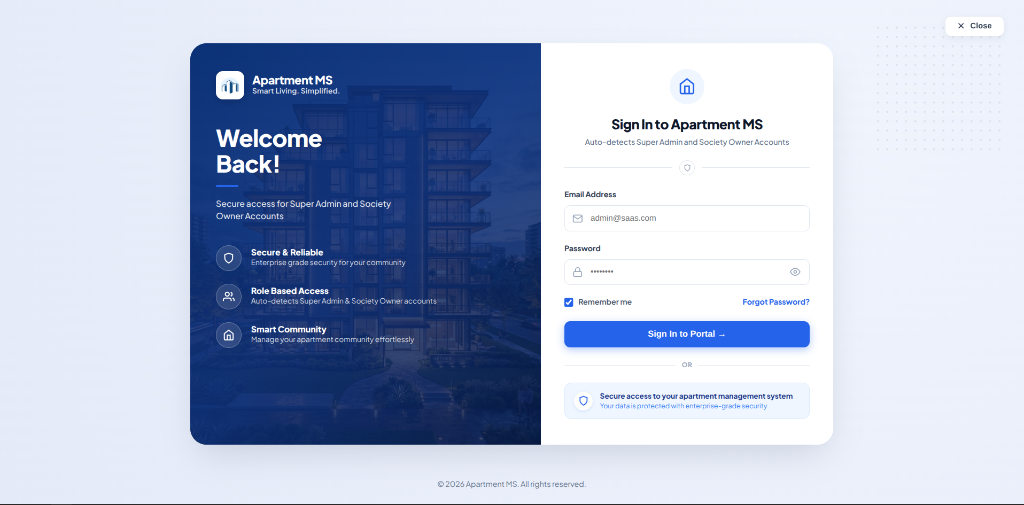
Access the centralized Apartment MS management web portal. The system automatically detects role permissions for Super Administrators, Society Owners, Committee Members, and Facility Staff upon authentication.

Portal Access Details
Open Login Page
Portal URL
https://app.apartmentms.in/login
Email Address
sk@gmail.com
Password
12345678
Apartment MS Portal — Sign In Interface
https://app.apartmentms.in/login
Apartment MS Login Portal Screen
Figure 1.1: Authentication Screen featuring role-based sign-in and direct credential entry. Live Interface

Login Steps

  1. Navigate to the Portal

    Open https://app.apartmentms.in/login in any modern browser (Chrome, Edge, Firefox, Safari).

  2. Enter Authorized Credentials

    Input your registered administrator or society email address (e.g., sk@gmail.com) and your password (e.g., 12345678).

  3. Role-Based Dashboard Redirection

    Check "Remember me" for persistent session state and click "Sign In to Portal →". The system authenticates and automatically routes you to your assigned Tenant or Society Console.

Tenant Console

2. Executive Dashboard

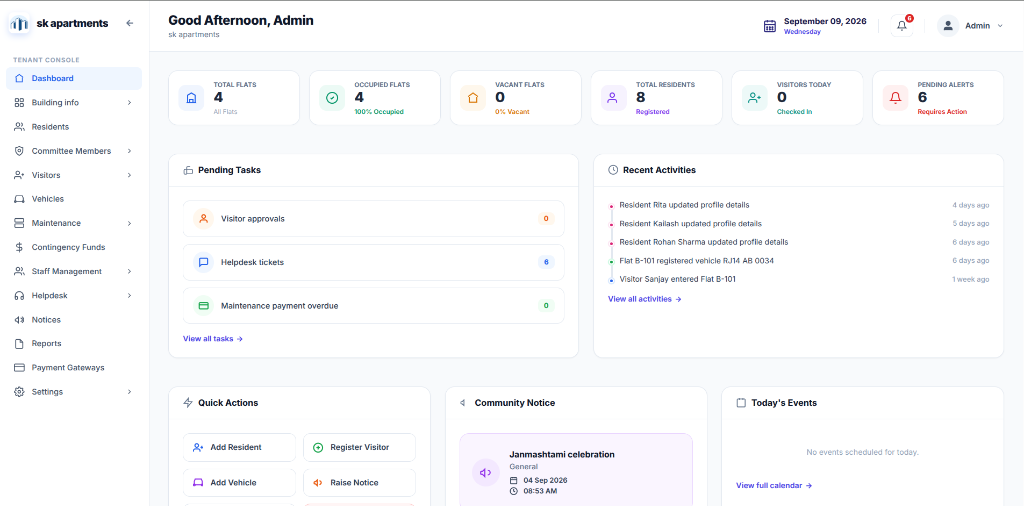
The executive dashboard provides an at-a-glance operational overview of the apartment complex, showing real-time occupancy statistics, pending alerts, immediate task lists, and recent activity logs.

Key Metric Indicators (KPIs)

TOTAL FLATS
4
All Flats
OCCUPIED FLATS
4
100% Occupied
VACANT FLATS
0
0% Vacant
TOTAL RESIDENTS
8
Registered
VISITORS TODAY
0
Checked In
PENDING ALERTS
6
Requires Action
Apartment MS Console — Executive Dashboard Overview
https://app.apartmentms.in/dashboard
Apartment MS Executive Dashboard Screen
Figure 2.1: Executive Tenant Console Dashboard displaying occupancy statistics, pending approvals, quick shortcuts, and building activity feed. Live Interface
Pending Tasks

Real-time counts of items requiring administrative intervention:

  • Visitor Approvals: Pending guard approvals
  • Helpdesk Tickets: Open resident maintenance requests
  • Maintenance Overdue: Flats with unpaid dues past deadline
Recent Activities

Continuous audit stream tracking building events:

  • Resident profile updates & contact modifications
  • Flat vehicle tag registrations (e.g., Flat B-101)
  • Visitor entry logs & security checkout timestamps
Quick Actions

One-click action buttons positioned for rapid daily management:

  • Add Resident: Onboard owners or tenants
  • Register Visitor: Log unexpected guest entry
  • Add Vehicle: Map resident car/bike to slot
  • Raise Notice: Broadcast emergency alerts
Notices & Events

Community engagement & calendar announcements:

  • Active broadcast circulars (e.g., festival celebrations)
  • Today's community events & AGM meetings schedule
  • Full calendar link with monthly overview
Property Architecture

3. Building Info

Manage the physical infrastructure of your society. Configure towers/blocks, floor tiers, flat inventories, and parking bay allotments.

A. Blocks (Towers)

Master block/tower configuration with unit and floor allocations.

  • Total Blocks (2) & Status Tracking
  • Block A & Block B Management
B. Floors

Multi-tier floor levels per block with occupancy metrics.

  • Floor tiers (Floor 1, Floor 2)
  • Occupied vs Vacant counters
C. Flats (Units)

Master inventory of all units, square footage, and owners/tenants.

  • 4 Total Flats (100% Occupied)
  • Owned (75%) vs Rented (25%)
D. Parking Management

Slot inventory tracking, vehicle assignment, and capacity stats.

  • Total 3 Slots (Four Wheeler L-Size)
  • Vehicle & Resident tag mapping

A Blocks (Towers) Management

Master Towers

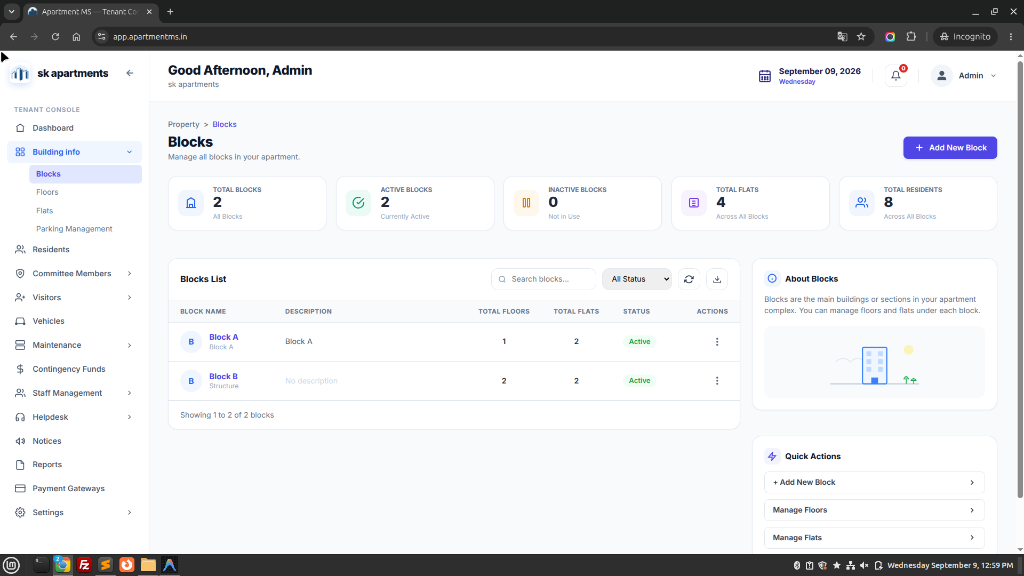
Define and manage all physical towers or wings in your society (e.g., Block A, Block B). Track aggregate statistics across all blocks including total units (4 Flats), registered occupants (8 Residents), and block-level facility supervisors.

Apartment MS — Property > Blocks List
https://app.apartmentms.in/blocks
Apartment MS Blocks Management Screen
Figure 3.A: Blocks Overview screen showing 2 Total Active Blocks, 4 Flats across blocks, 8 Registered Residents, and quick action shortcuts. Live Interface

B Floors Configuration

Floor Tiers

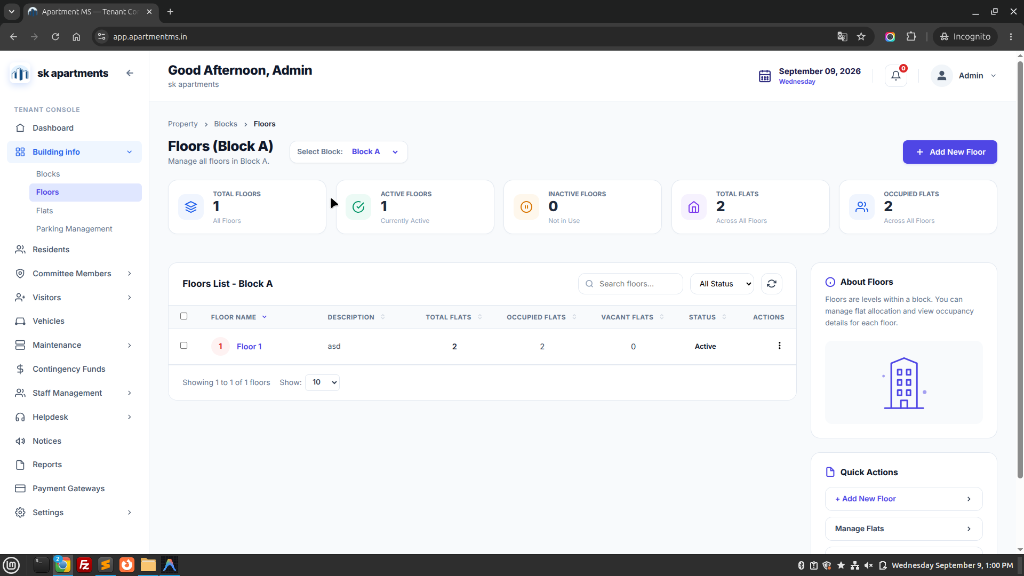
Organize floor levels per block. Filter by block (e.g., Block A), review floor names (e.g., Floor 1), monitor occupied vs vacant ratios, and utilize the "+ Add New Floor" modal or bulk generator.

Apartment MS — Property > Blocks > Floors (Block A)
https://app.apartmentms.in/floors?block=Block+A
Apartment MS Floors Management Screen
Figure 3.B: Multi-tier Floor Configuration screen for Block A with active floor status, 100% flat occupancy, and search filtering. Live Interface

C Flats (Units Master Inventory)

Unit Inventory

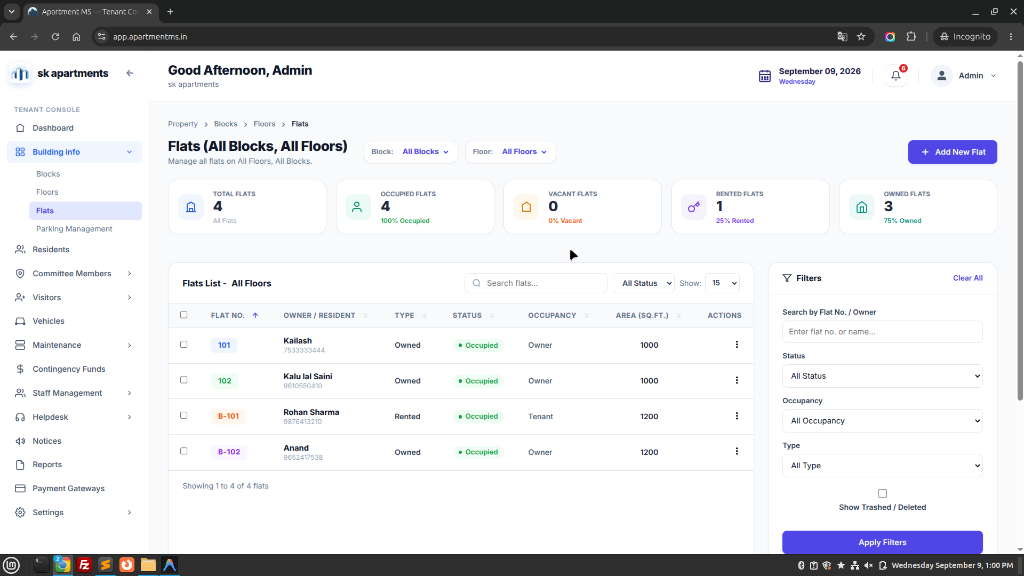
Comprehensive master flat directory mapping every unit (Flat 101, 102, B-101, B-102) with registered Owner / Resident names, contact phone numbers, ownership type (Owned vs Rented), active occupancy status, and built-up area in square feet (1000 - 1200 sq.ft.).

Apartment MS — Flats List (All Blocks, All Floors)
https://app.apartmentms.in/flats
Apartment MS Flats Directory Screen
Figure 3.C: Master Flats Inventory listing all units, owner/tenant links, square footage, ownership classification, and quick filter sidebar. Live Interface

D Parking Management

Bay Allocations

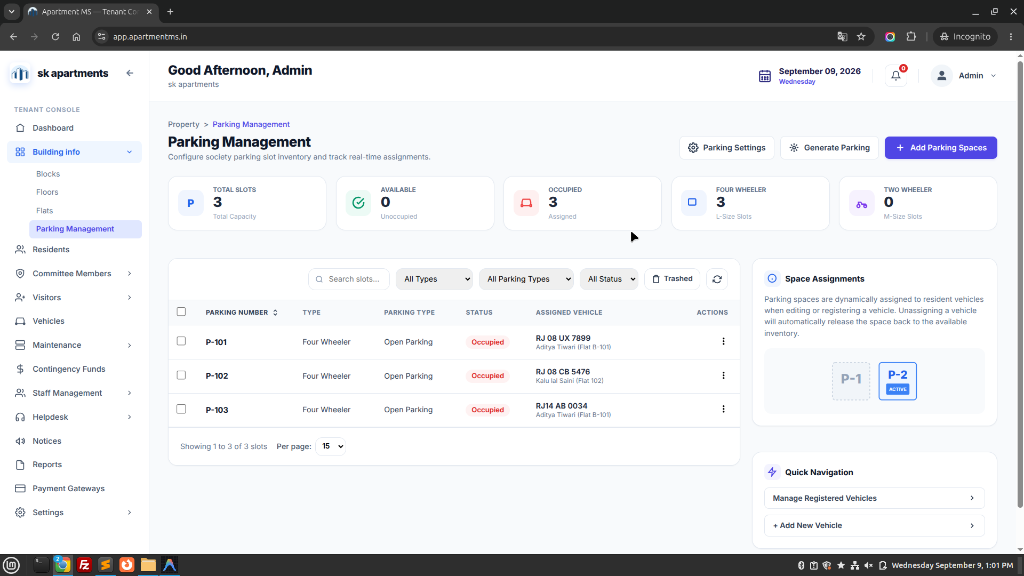
Configure society parking slot inventory and track real-time allocations. Monitor slot status (P-101, P-102, P-103), slot category (Four Wheeler L-Size vs Two Wheeler M-Size), open parking designation, and exact assigned vehicle registration numbers linked to resident profiles.

Apartment MS — Property > Parking Management
https://app.apartmentms.in/parking
Apartment MS Parking Management Screen
Figure 3.D: Parking Management console displaying 3 Four-Wheeler slots, 100% assignment rate, assigned vehicle license plates, and space allocations. Live Interface
Member Master

4. Residents Directory

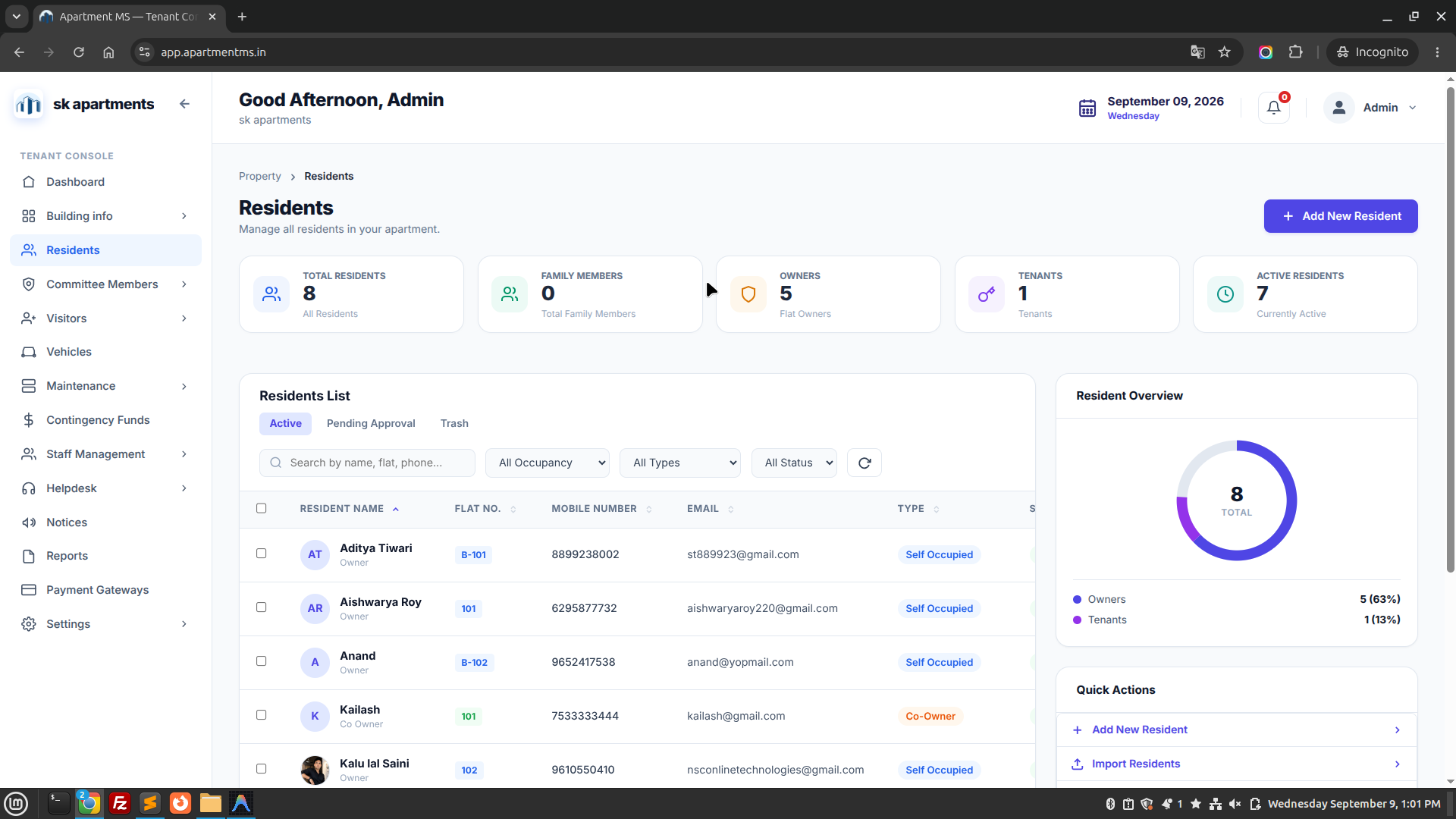
Manage comprehensive resident records for both property owners and active tenants, including contact numbers, move-in dates, and KYC documentation.

Owner Management

Maintains legal property ownership records, emergency contact numbers, and possession records.

  • Primary owner & co-owner contact directory
  • Society voting rights eligibility assignment
  • Multiple property ownership mapping across blocks
Tenant Lifecycle & NOC

Oversees lease commencement, expiry warnings, owner approval verifications, and move-in/out NOCs.

  • Rental agreement start & end date reminders
  • Police verification certificate status tracking
  • Move-in and move-out security clearance pass
Apartment MS — Residents Directory Console
https://app.apartmentms.in/residents
Apartment MS Residents Directory Screen
Figure 4.1: Residents Directory displaying occupant rosters, active owner/tenant badges, assigned flats, and verification statuses. Live Interface
Governance

5. Committee Members

Structure managing committee leadership, assign governance designations, and specify administrative spending and approval thresholds.

A. Members Directory

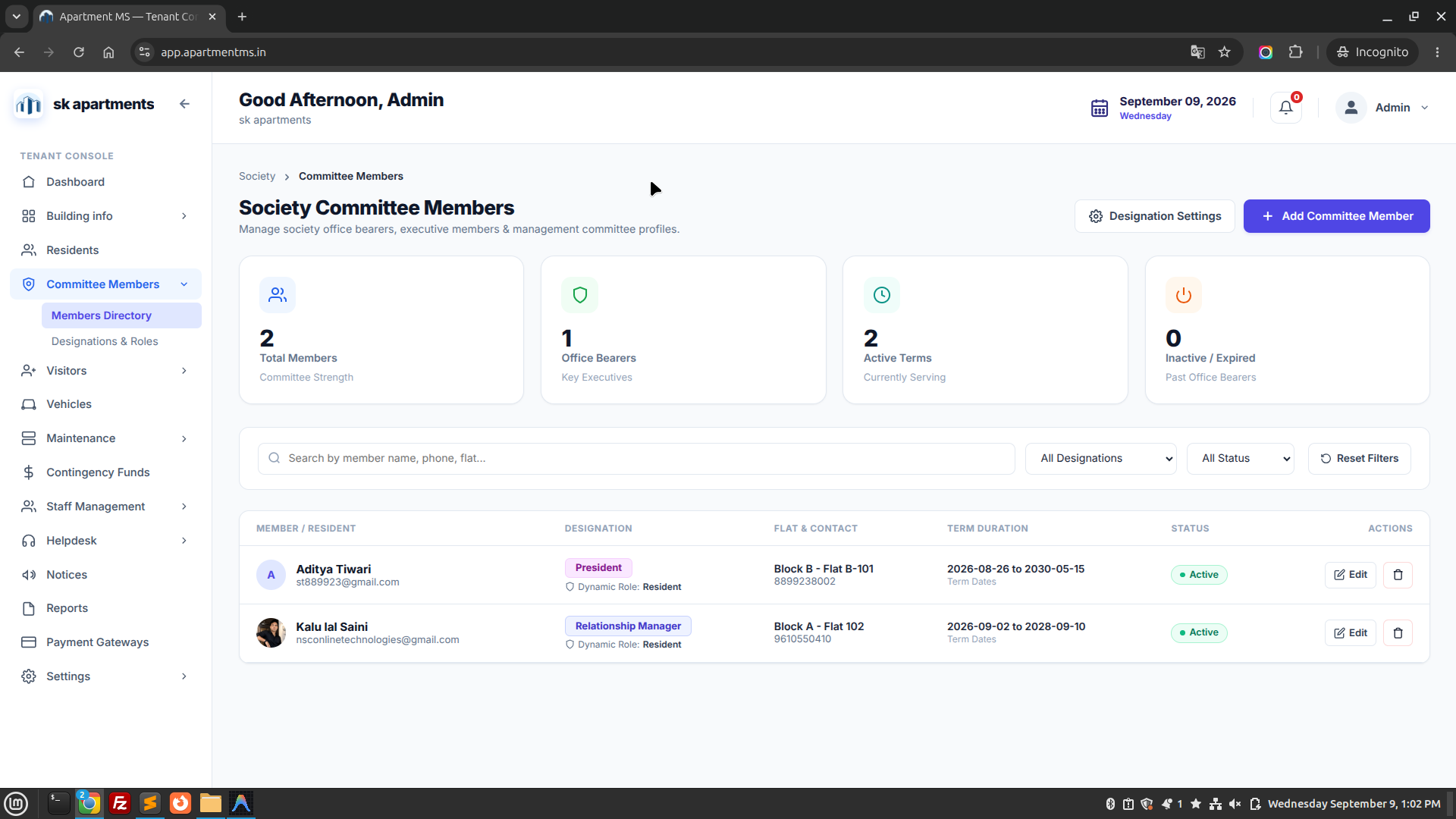
Official roster of elected managing committee representatives with direct contact channels.

  • Full name, designated flat number, and contact info
  • Committee term duration & election tenure dates
  • Emergency contact availability badges for residents
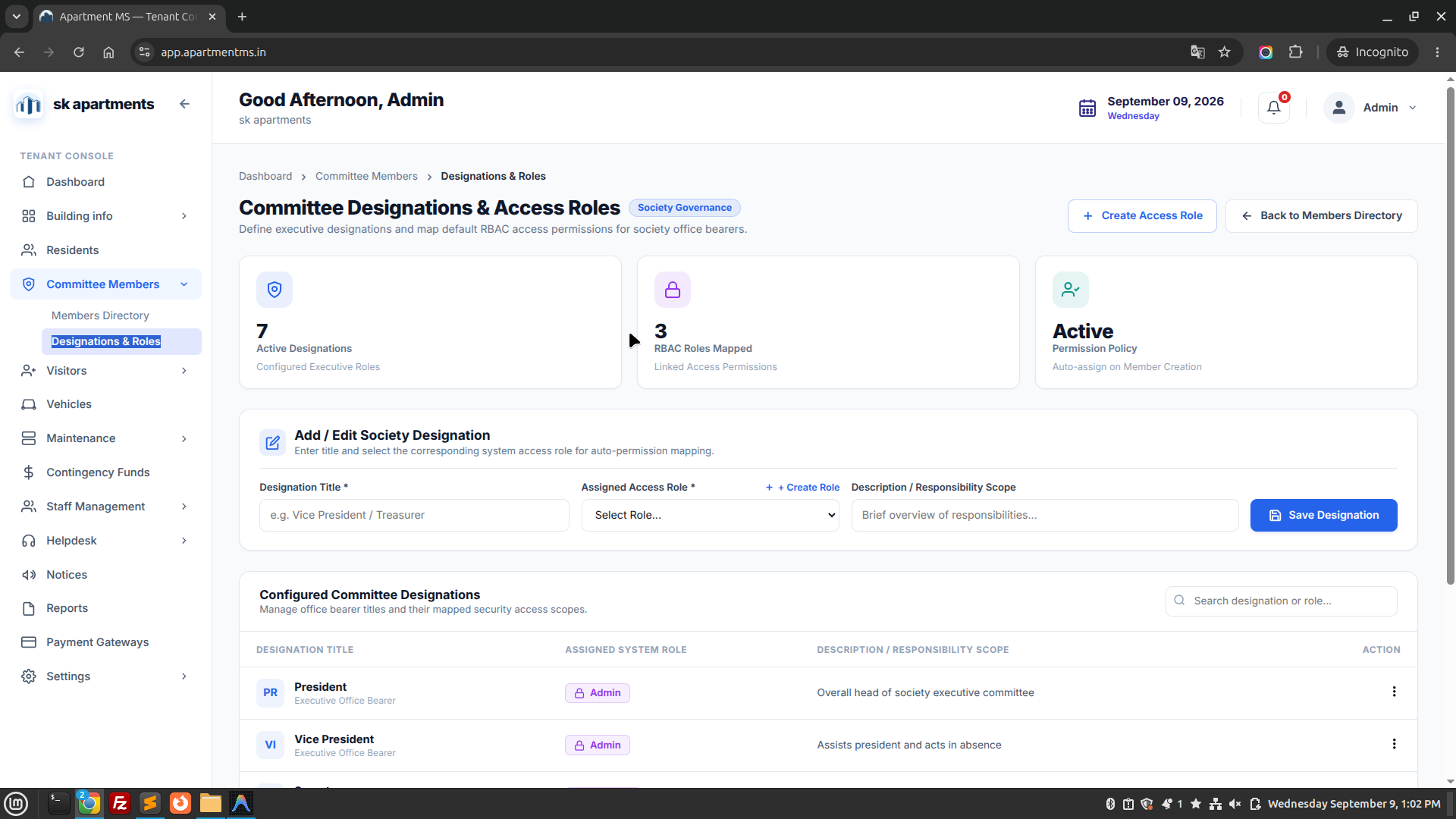
B. Designations & Roles

Assign statutory titles and delegate administrative authorization limits.

  • President: Overall society executive oversight
  • Secretary: Notice publishing, minutes, & AGMs
  • Treasurer: Bank approvals, ledgers, & collections
Apartment MS — Committee Members Directory
https://app.apartmentms.in/committee-members
Apartment MS Committee Members Screen
Figure 5.A: Official Managing Committee directory showing elected leadership team, contact lines, and term statuses. Live Interface
Apartment MS — Committee Designations & Roles
https://app.apartmentms.in/designations
Apartment MS Designations and Roles Screen
Figure 5.B: Governance designations matrix defining administrative roles, privileges, and signing powers. Live Interface
Gate Security

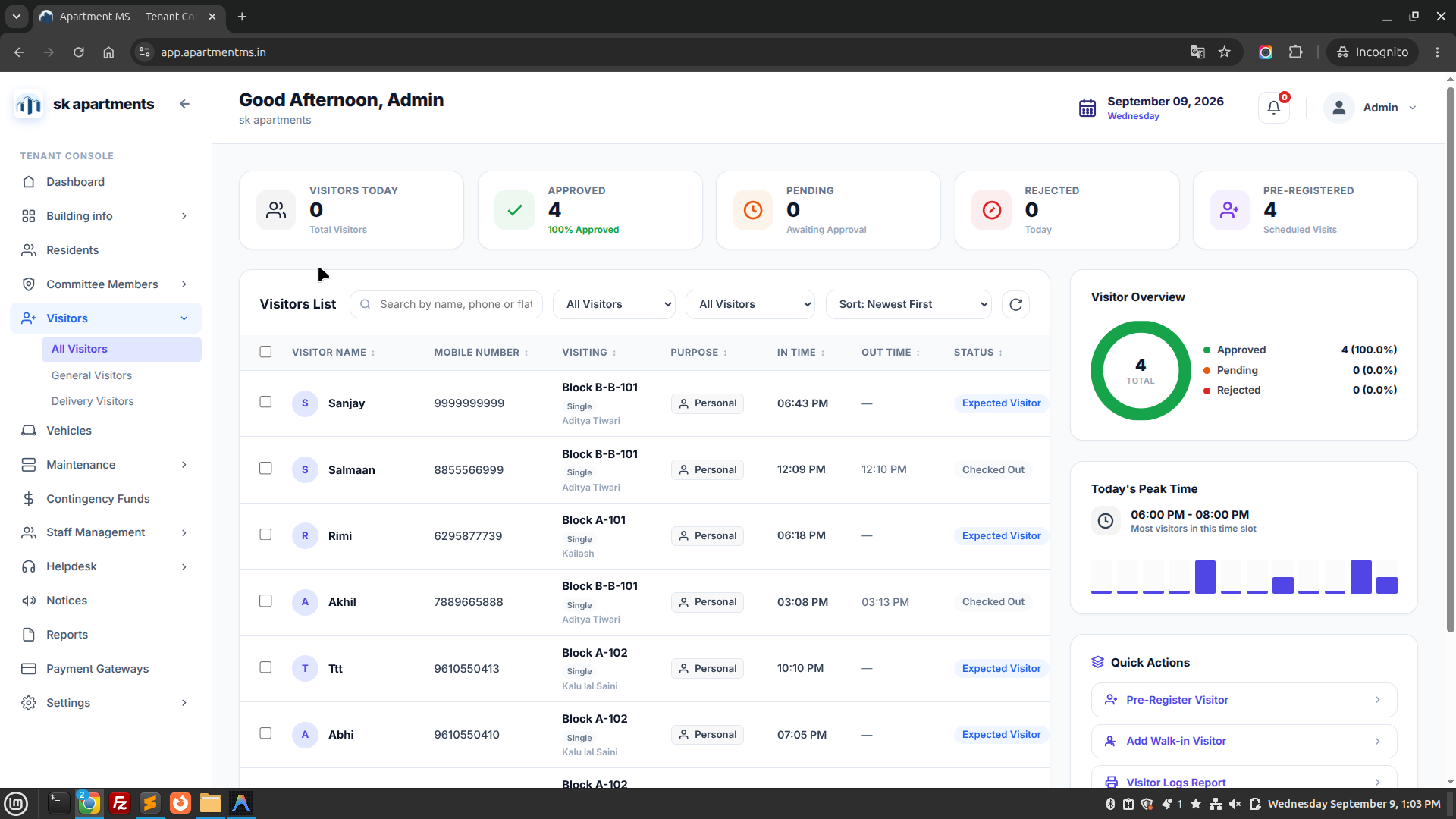
6. Visitor Management

Streamlined gate security logging replacing physical guard registers with digital OTP passes, resident approvals, and delivery tracking.

A. All Visitors

Central real-time security log tracking every individual entering and exiting the main gates.

  • Visitor name, mobile number, & photo capture
  • Target block and flat number destination
  • Exact entry & exit timestamps with duration log
B. General Visitors

Personal guests, relatives, and contractors visiting resident apartments.

  • Automated resident mobile approval notification
  • Pre-approved visitor invite pass generated by residents
  • Instant entry via 4-digit guest OTP passcode
C. Delivery Visitors

Express check-in workflow tailored for courier and food delivery personnel.

  • Quick service tagging (Swiggy, Zomato, Amazon, Courier)
  • Main gate parcel drop-off box logging
  • Automatic checkout reminder after 15 minutes
Apartment MS — Visitor Gate Log
https://app.apartmentms.in/visitors
Apartment MS Visitors Management Screen
Figure 6.1: Digital Visitor Gate Security dashboard with entry logs, vehicle numbers, phone verification, and departure timestamps. Live Interface
Gate Barrier

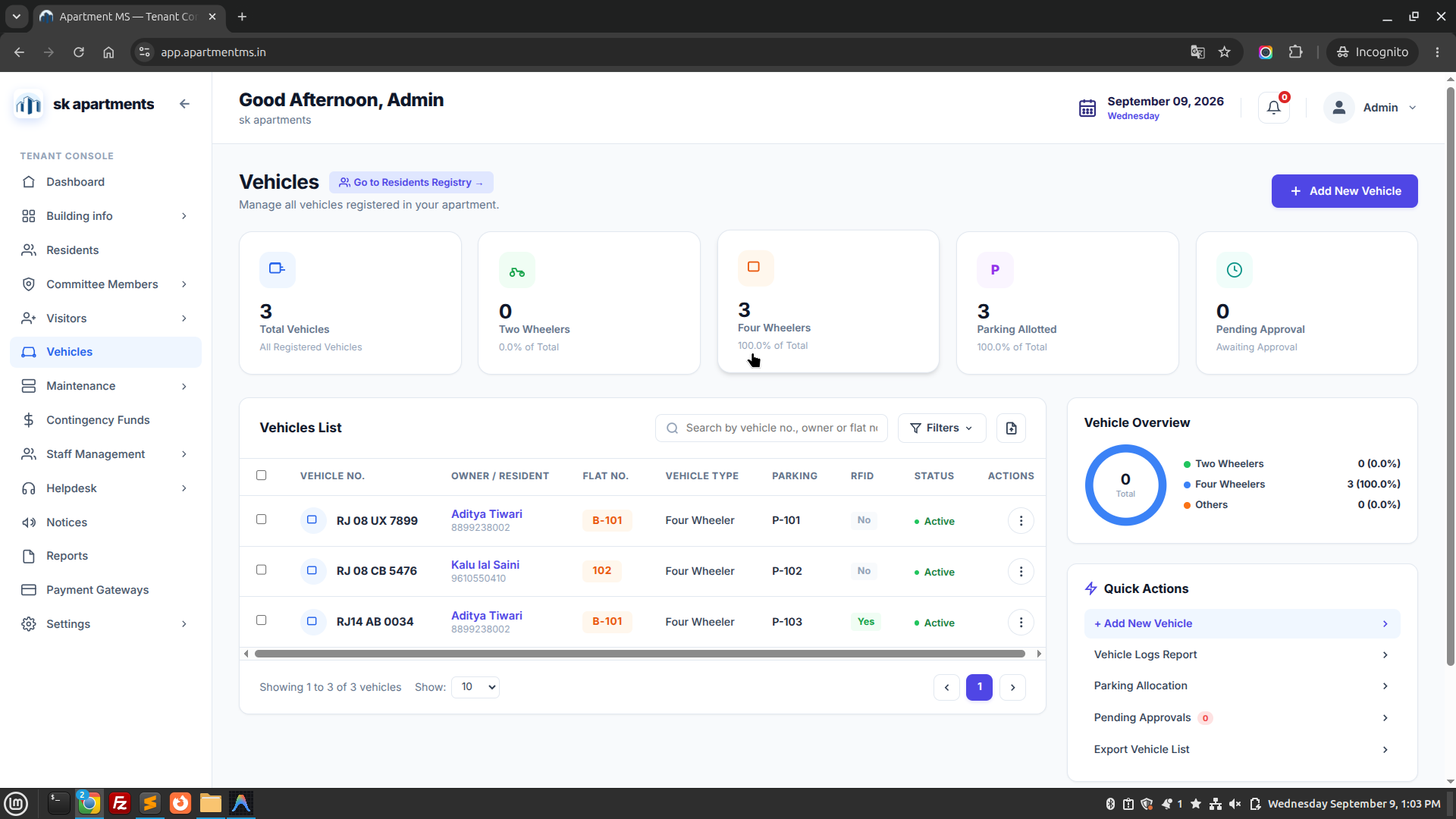
7. Vehicles Registry

Maintain a searchable directory of resident and staff vehicles to regulate entry, assign parking bays, and prevent unauthorized parking.

  • License Plate Directory: Search any vehicle registration number to instantly identify the corresponding flat and owner phone.
  • RFID & Fastag Integration: Automatic boom barrier opening for authorized vehicles upon sensor detection.
  • Parking Violation Tickets: Guards can issue digital photo notices for vehicles parked in wrong bays or fire lanes.
Apartment MS — Registered Vehicles Registry
https://app.apartmentms.in/vehicles
Apartment MS Vehicles Management Screen
Figure 7.1: Society Vehicle Master Directory listing license plate numbers, resident flat tags, vehicle models, and parking authorization. Live Interface
Finance Core

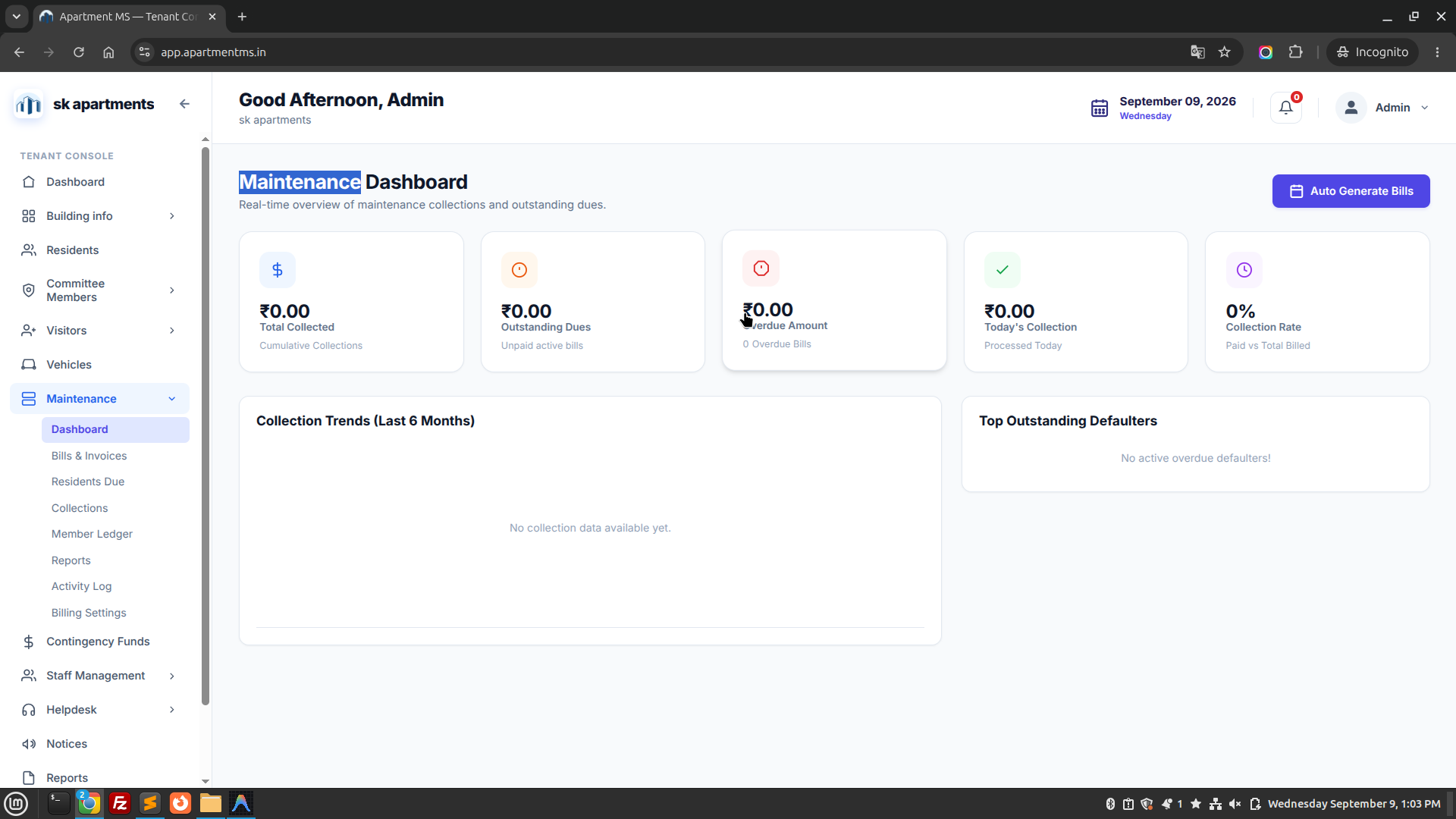
8. Maintenance & Billing Engine

Comprehensive financial engine automating society maintenance bill generation, dues monitoring, digital receipt creation, and double-entry member ledgers.

A. Dashboard

Financial health snapshot: Total Billed, Total Collected, Outstanding Defaulter Balance, and month-over-month trends.

B. Bills & Invoices

Automated batch invoice generation based on sq. ft. or fixed rates. PDF invoice download with breakdown.

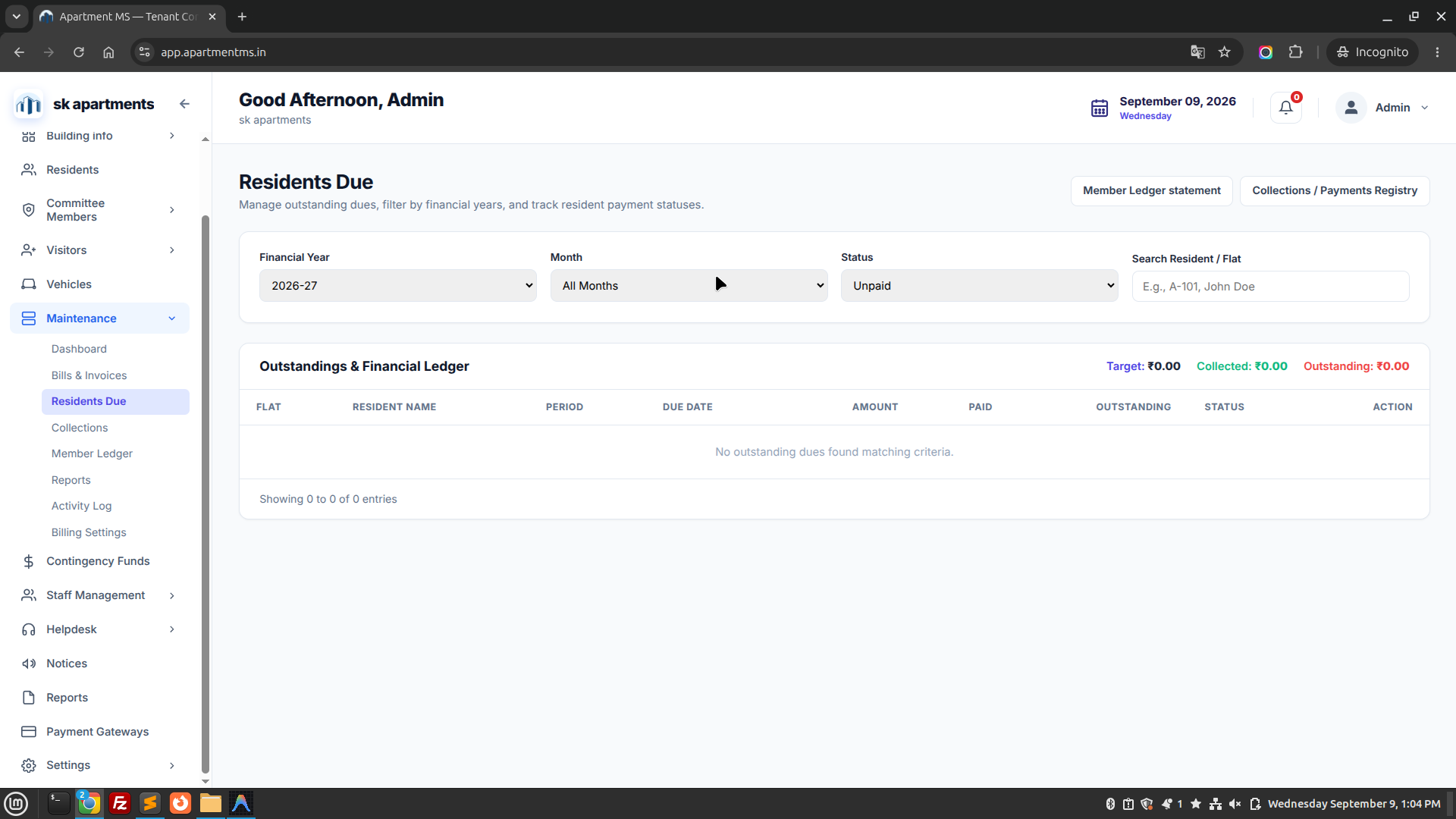
C. Residents Due

Defaulter aging list (0-30, 31-60, 90+ days). Automated WhatsApp, SMS, and email payment reminder triggers.

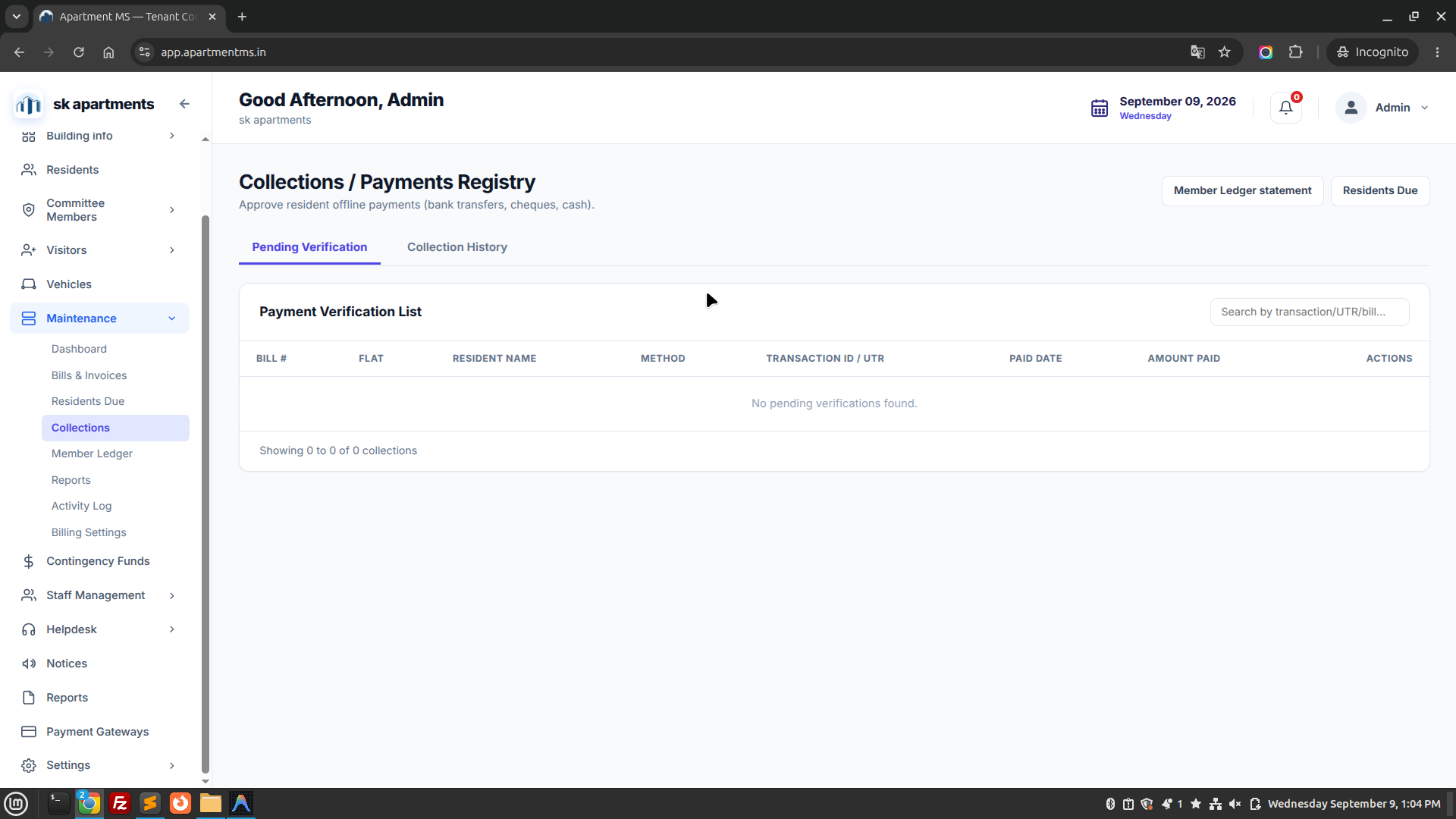
D. Collections

Record offline cash, cheques, bank NEFT/RTGS transfers, and automated online payment gateway settlements.

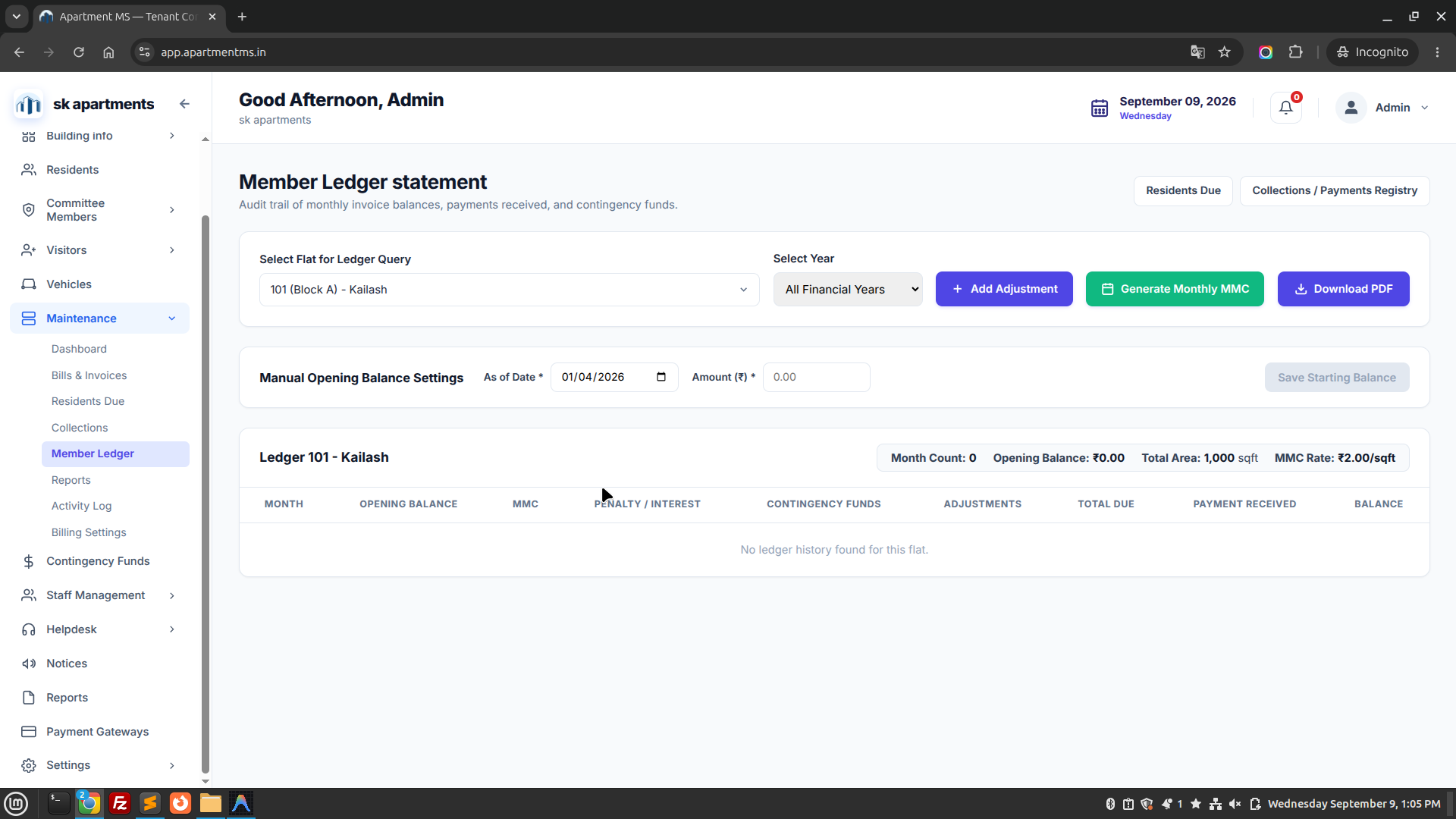
E. Member Ledger

Complete individual flat account statements reflecting opening balance, monthly debits, credits, and closing balance.

F. Reports

Export collection summaries, pending dues spreadsheets, GST statements, and annual audit reports.

G. Activity Log

Audit trail capturing every manual payment adjustment, penalty waiver, invoice recreation, and user action.

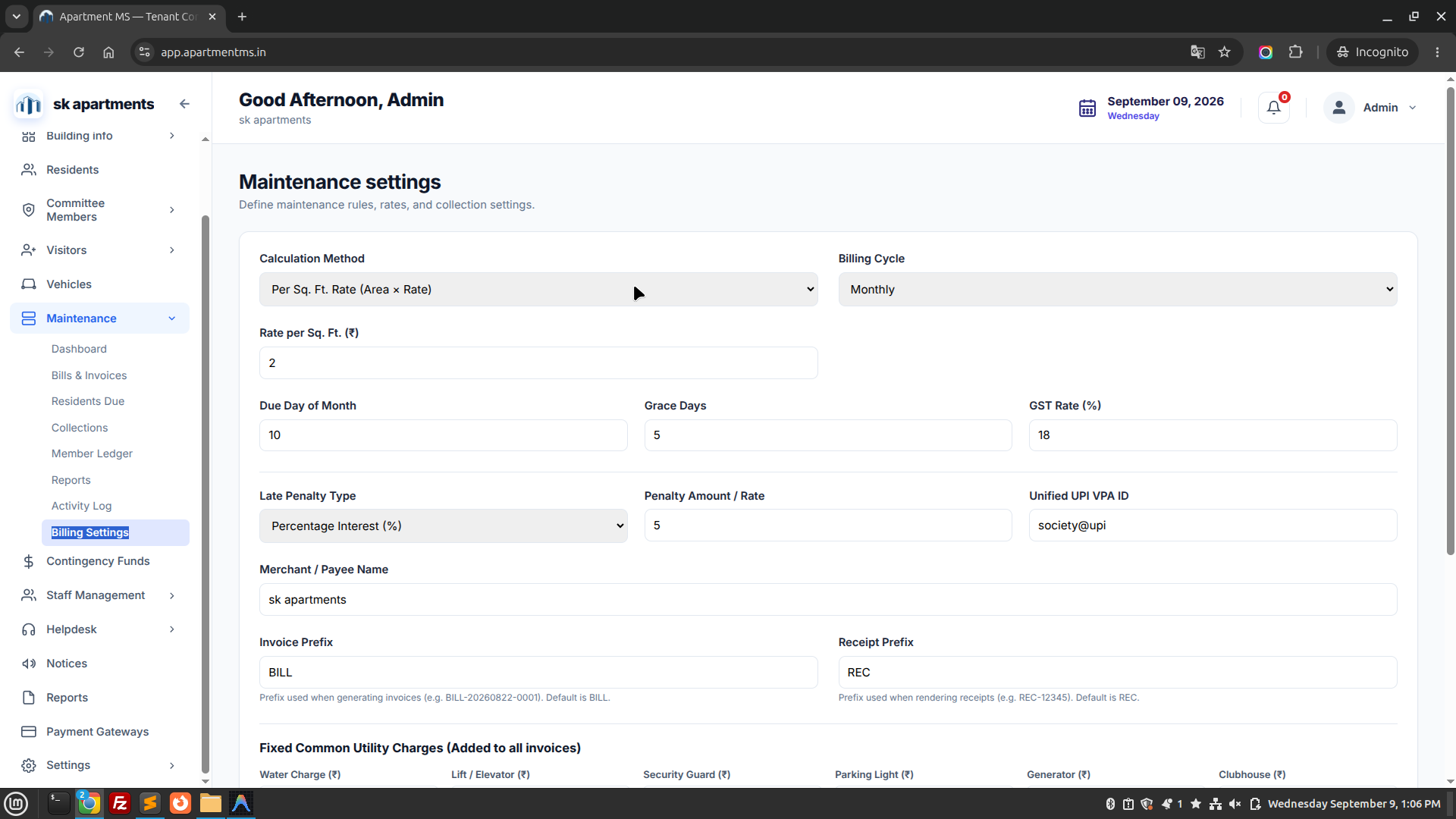
H. Billing Settings

Configure billing cycle (monthly/quarterly), billing date, payment grace period, and late fine interest rate.

Apartment MS — Maintenance Dashboard Overview
https://app.apartmentms.in/maintenance
Apartment MS Maintenance Overview Screen
Figure 8.A: Maintenance billing management overview displaying bill summaries and payment flows. Live Interface
Apartment MS — Maintenance > Residents Due
https://app.apartmentms.in/maintenance/due
Apartment MS Residents Due Screen
Figure 8.B: Residents Due register tracking outstanding balances per flat with reminder actions. Live Interface
Apartment MS — Maintenance > Collections
https://app.apartmentms.in/maintenance/collections
Apartment MS Collections Screen
Figure 8.C: Collections transaction log recording digital payments, cash, cheques, and receipts. Live Interface
Apartment MS — Maintenance > Member Ledger
https://app.apartmentms.in/maintenance/ledger
Apartment MS Member Ledger Screen
Figure 8.D: Double-entry Member Ledger tracking flat debit/credit history and closing balances. Live Interface
Apartment MS — Maintenance > Billing Settings
https://app.apartmentms.in/maintenance/settings
Apartment MS Billing Settings Screen
Figure 8.E: Billing configuration settings for penalty rates, grace intervals, and recurring cycles. Live Interface
Reserve Accounting

9. Contingency & Sinking Funds

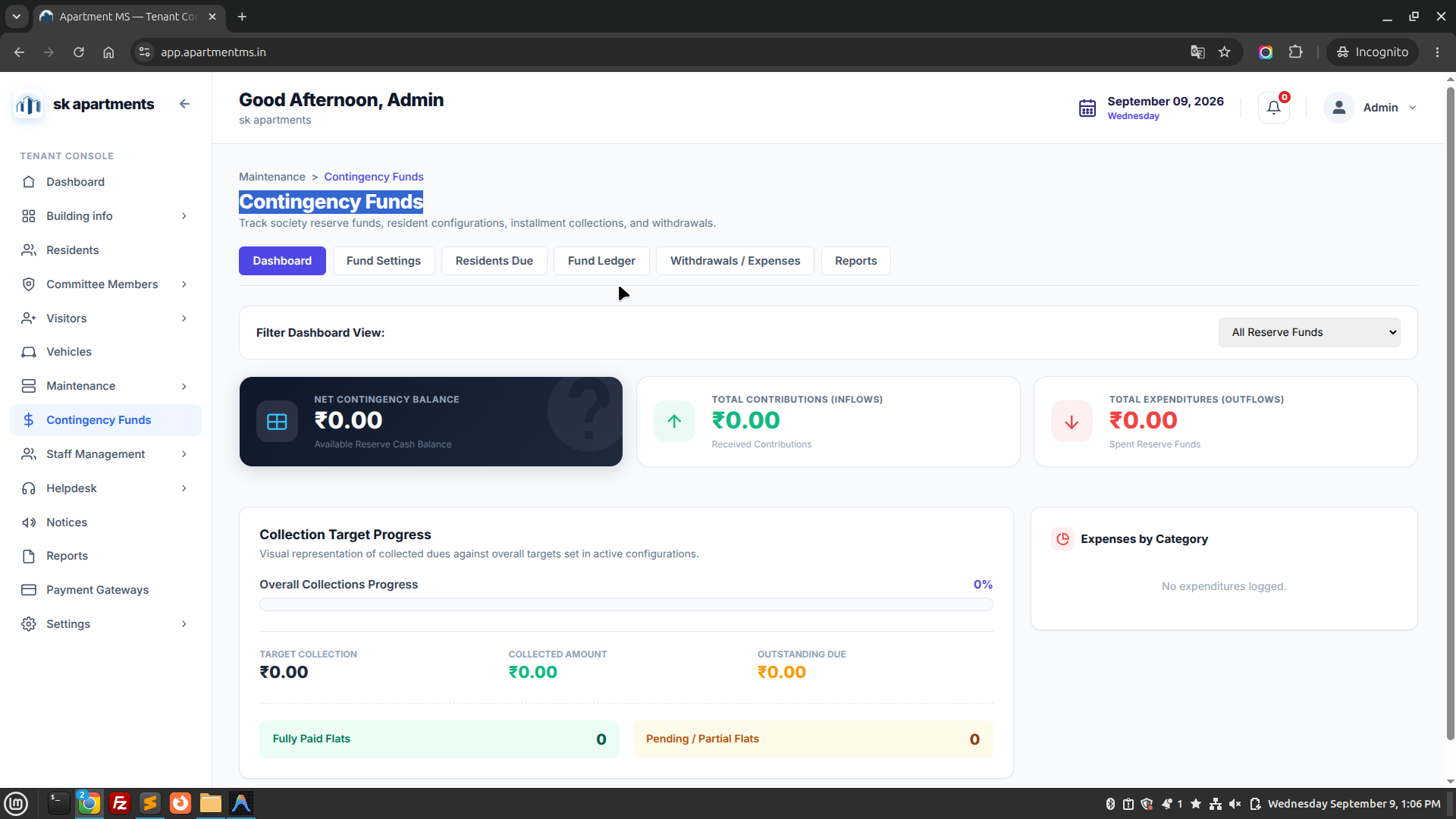
Manage long-term reserve capital for statutory sinking funds, building repainting reserves, elevator overhauls, and emergency repairs.

  • Dedicated Fund Accounts: Segregate general maintenance collections from non-operational sinking reserves.
  • Contribution Allocation: Automatically earmark a fixed percentage or fixed rupee amount from every monthly bill toward reserve accounts.
  • Expense Withdrawals: Requires dual-committee approval to record capital expenditure disbursements.
Apartment MS — Contingency & Reserve Funds
https://app.apartmentms.in/contingency-funds
Apartment MS Contingency Funds Screen
Figure 9.1: Sinking reserves and contingency balance accounts tracking capital reserve health. Live Interface
Facility Workforce

10. Staff Management

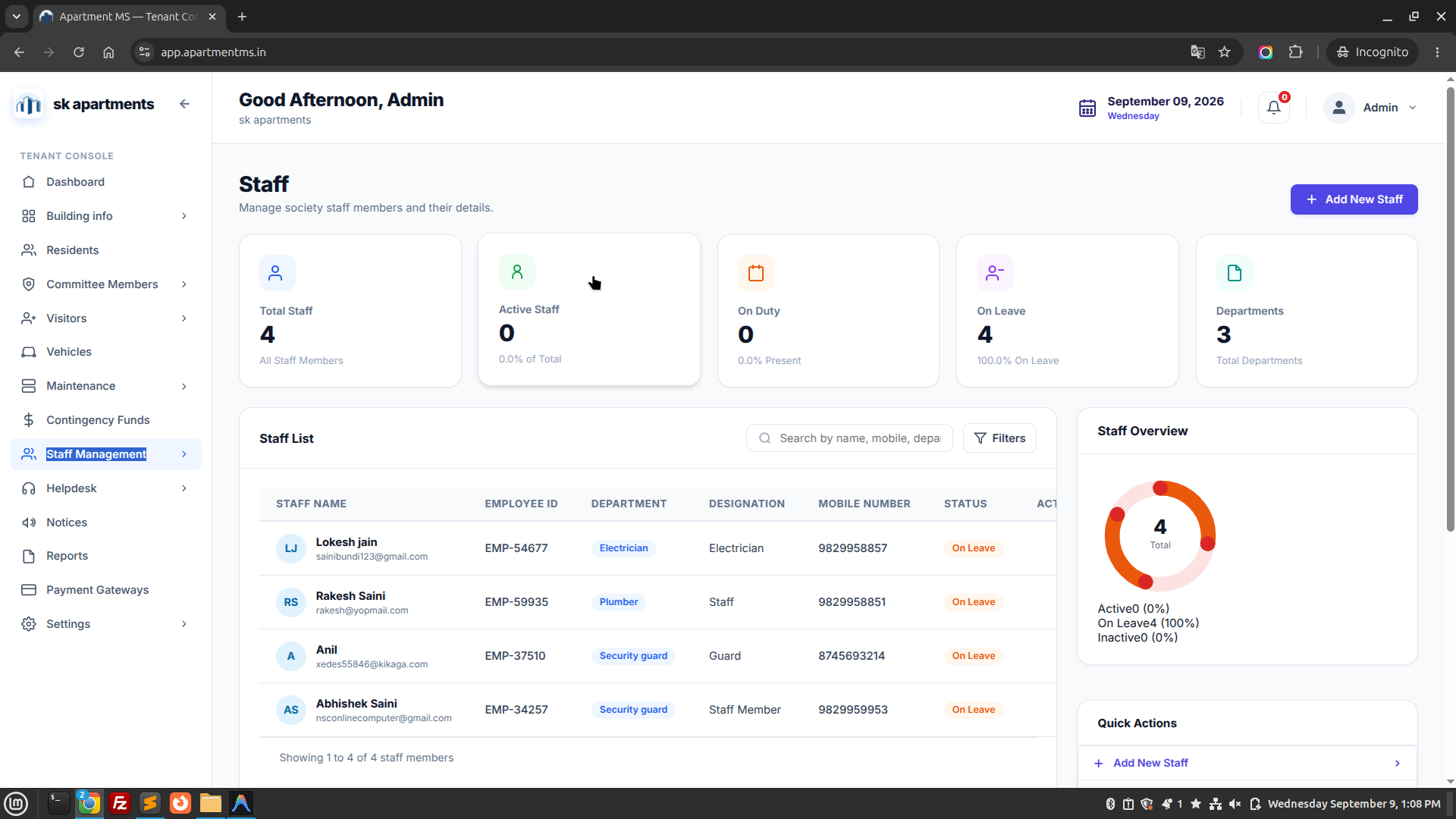
Administer security guards, housekeeping teams, facility electricians, plumbers, and administrative clerks.

Staff Directory

Profiles with photo, Aadhaar KYC verification, job role, and assigned shift timing.

Attendance & Shifts

Digital shift roster, daily punch-in/punch-out records, and leave management tracking.

Payroll & Advances

Record monthly salary disbursements, vendor contract terms, and employee cash advance vouchers.

Apartment MS — Staff Management Directory
https://app.apartmentms.in/staff
Apartment MS Staff Management Screen
Figure 10.A: Facility staff roster showing employee records, contact numbers, roles, and status. Live Interface
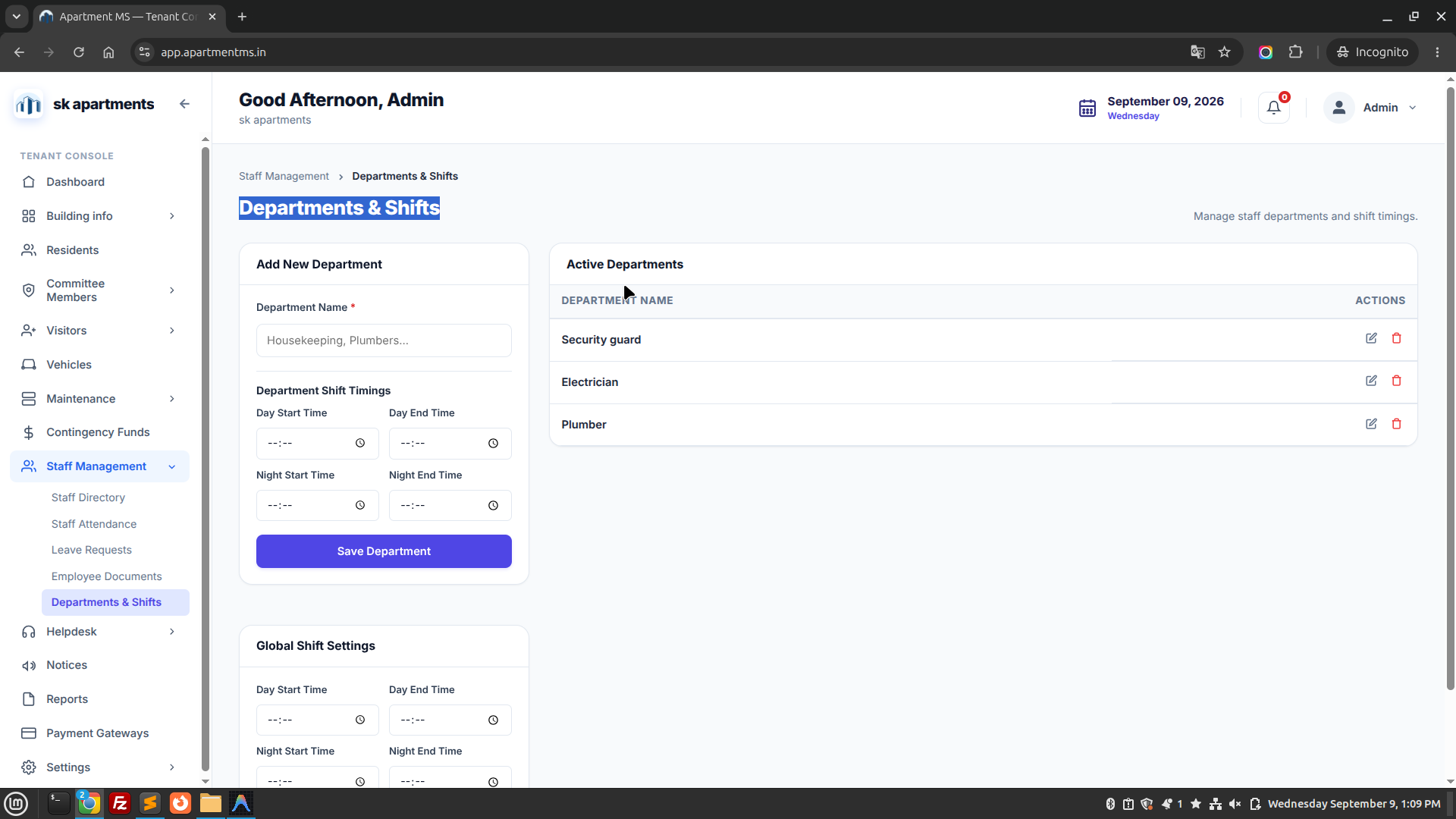
Apartment MS — Departments & Shifts
https://app.apartmentms.in/staff/shifts
Apartment MS Departments and Shifts Screen
Figure 10.B: Department rosters and shift timing schedule configuration console. Live Interface
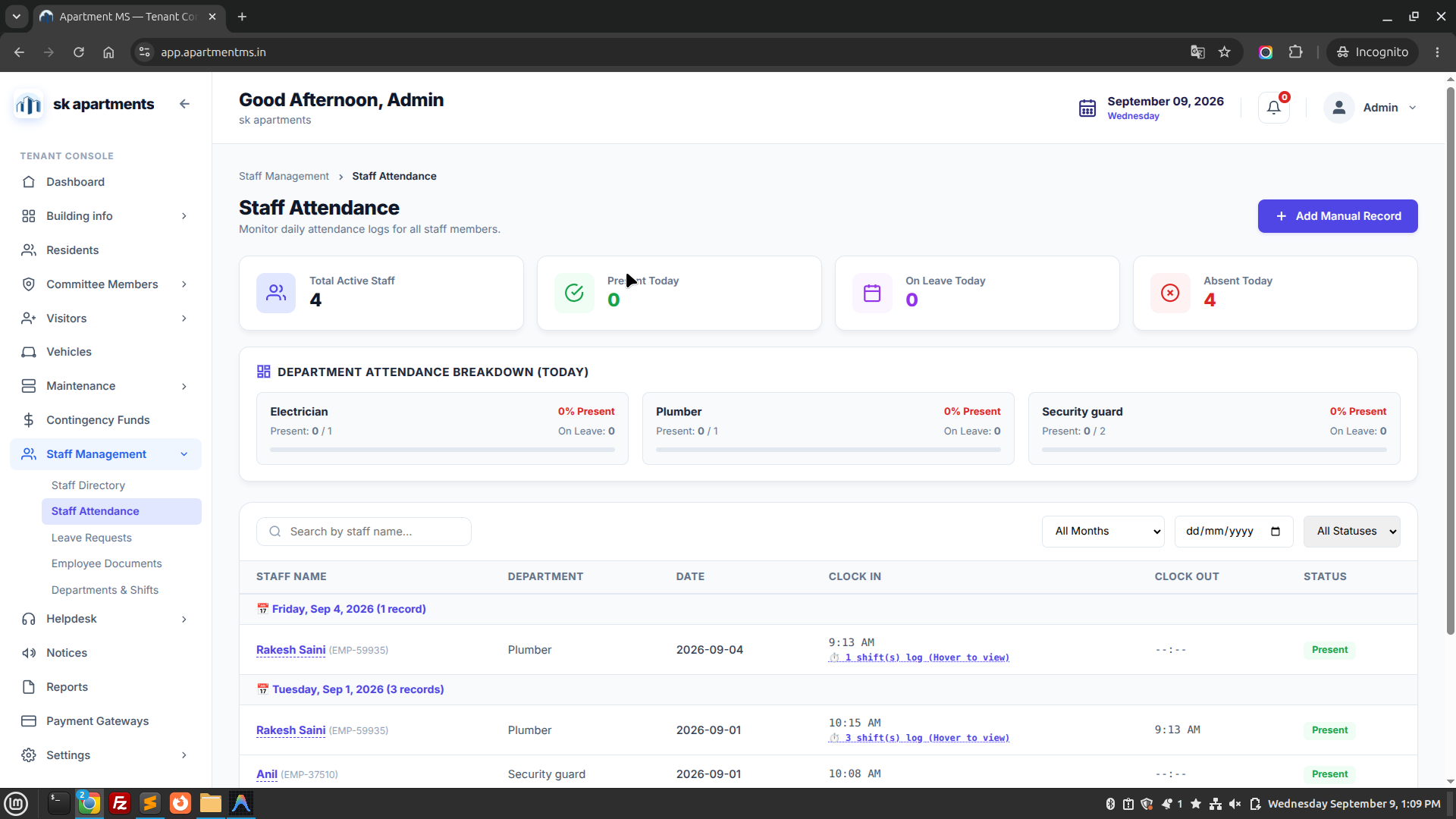
Apartment MS — Staff Attendance
https://app.apartmentms.in/staff/attendance
Apartment MS Staff Attendance Screen
Figure 10.C: Daily staff attendance logs tracking check-in, check-out, and active duty hours. Live Interface
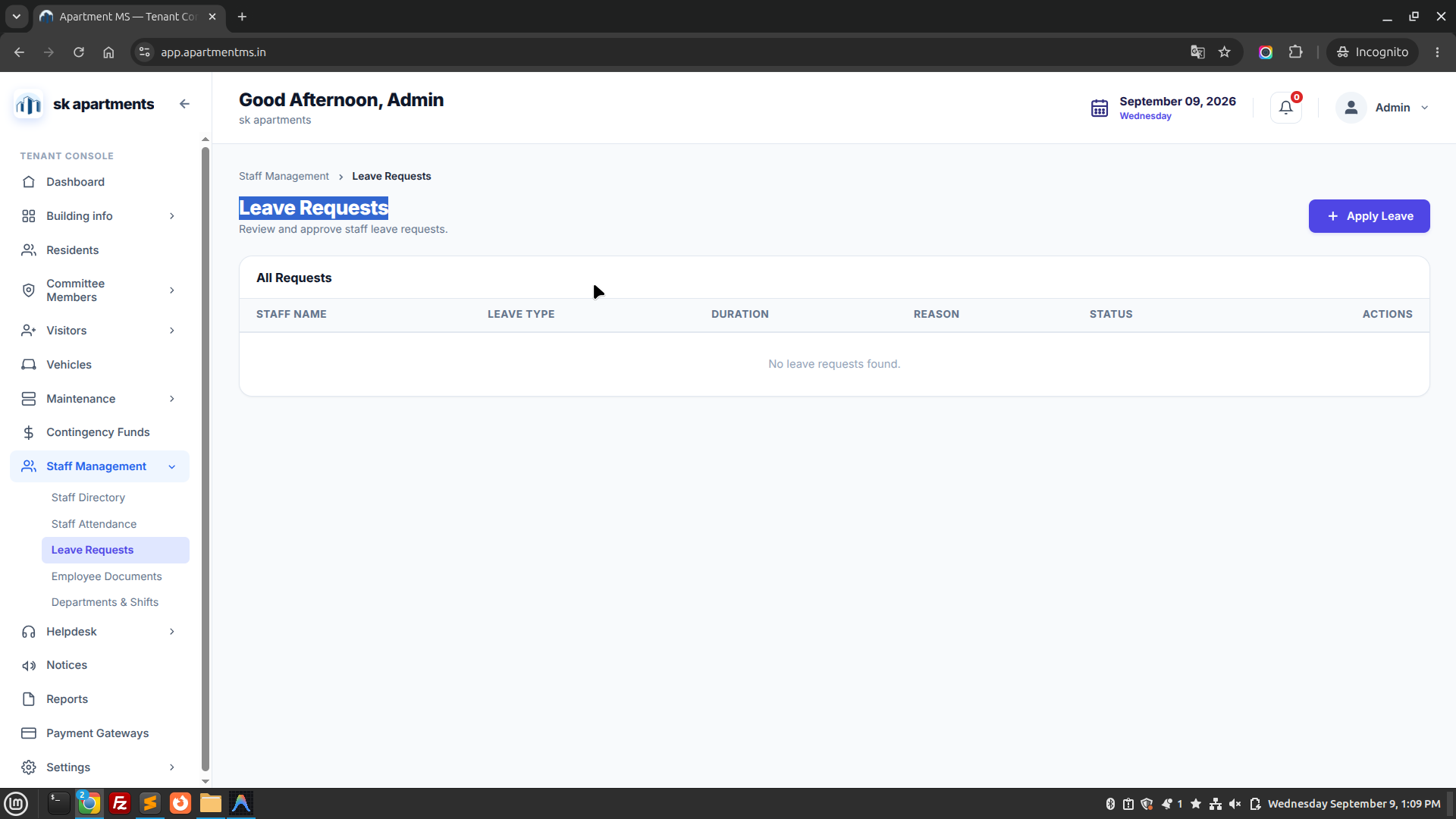
Apartment MS — Staff Leave Requests
https://app.apartmentms.in/staff/leave
Apartment MS Leave Requests Screen
Figure 10.D: Staff leave request approval console with leave types and approval status. Live Interface
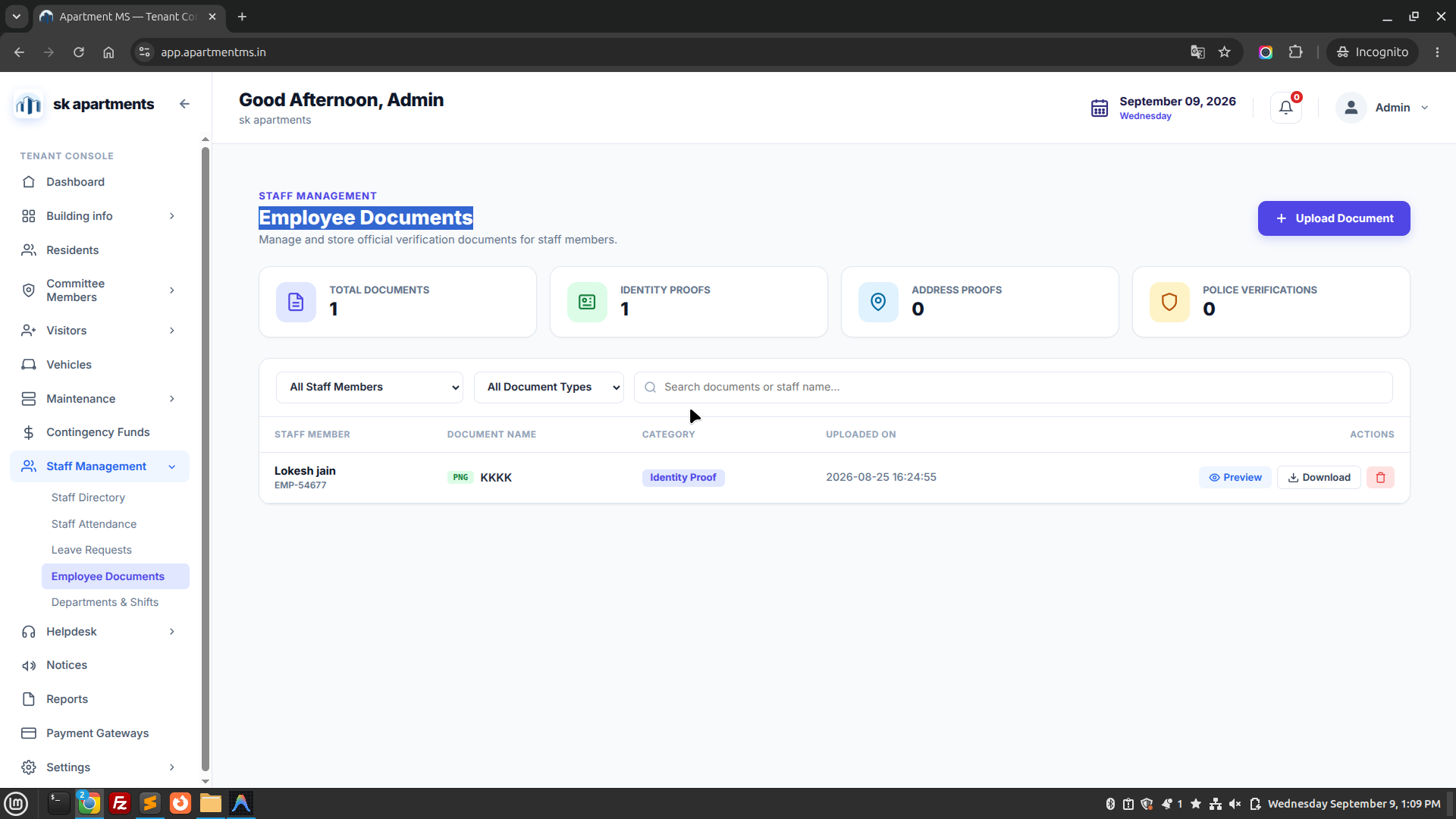
Apartment MS — Employee Documents
https://app.apartmentms.in/staff/documents
Apartment MS Employee Documents Screen
Figure 10.E: Employee KYC document repository including identity proofs, police verifications, and contracts. Live Interface

Service SLA

11. Helpdesk & Service Tickets

Streamlined resident complaint tracking system with automated technician routing, photo proofs, and resolution SLA timers.

A. Complaints Log

Filterable list of Open, In Progress, and Resolved tickets with priority tags (Emergency, High, Normal).

B. Service Categories

Predefined issue types: Electrical, Plumbing, Lift/Elevator, Carpentry, Common Area, and Security concerns.

C. Auto-Assignment Engine

Smart engine automatically dispatches tickets to on-duty staff based on category and shift availability.

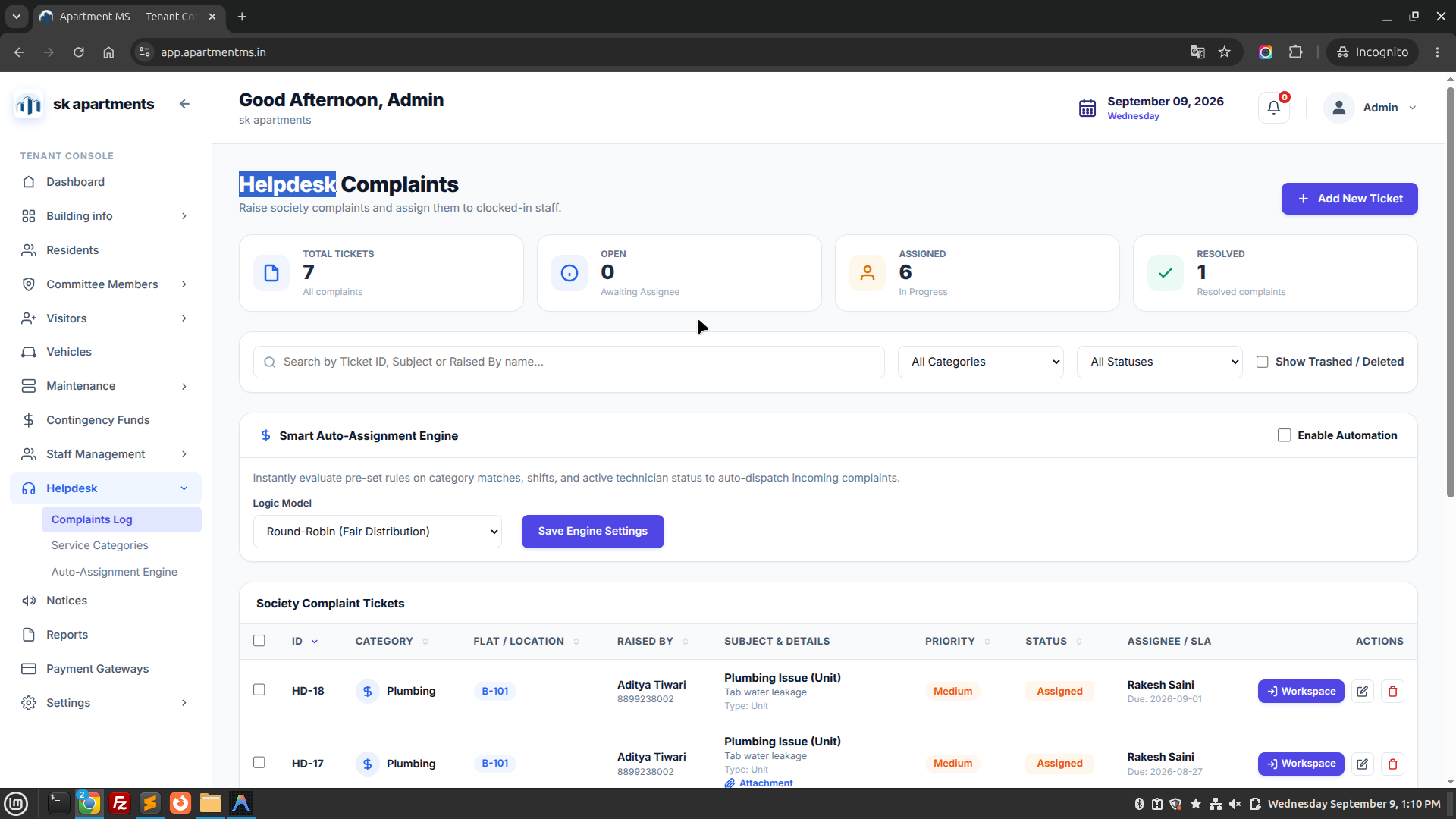
Apartment MS — Helpdesk & Service Complaints
https://app.apartmentms.in/helpdesk
Apartment MS Helpdesk Screen
Figure 11.1: Helpdesk ticketing dashboard displaying open complaint queues, technician assignment, and SLA timers. Live Interface
Broadcasts

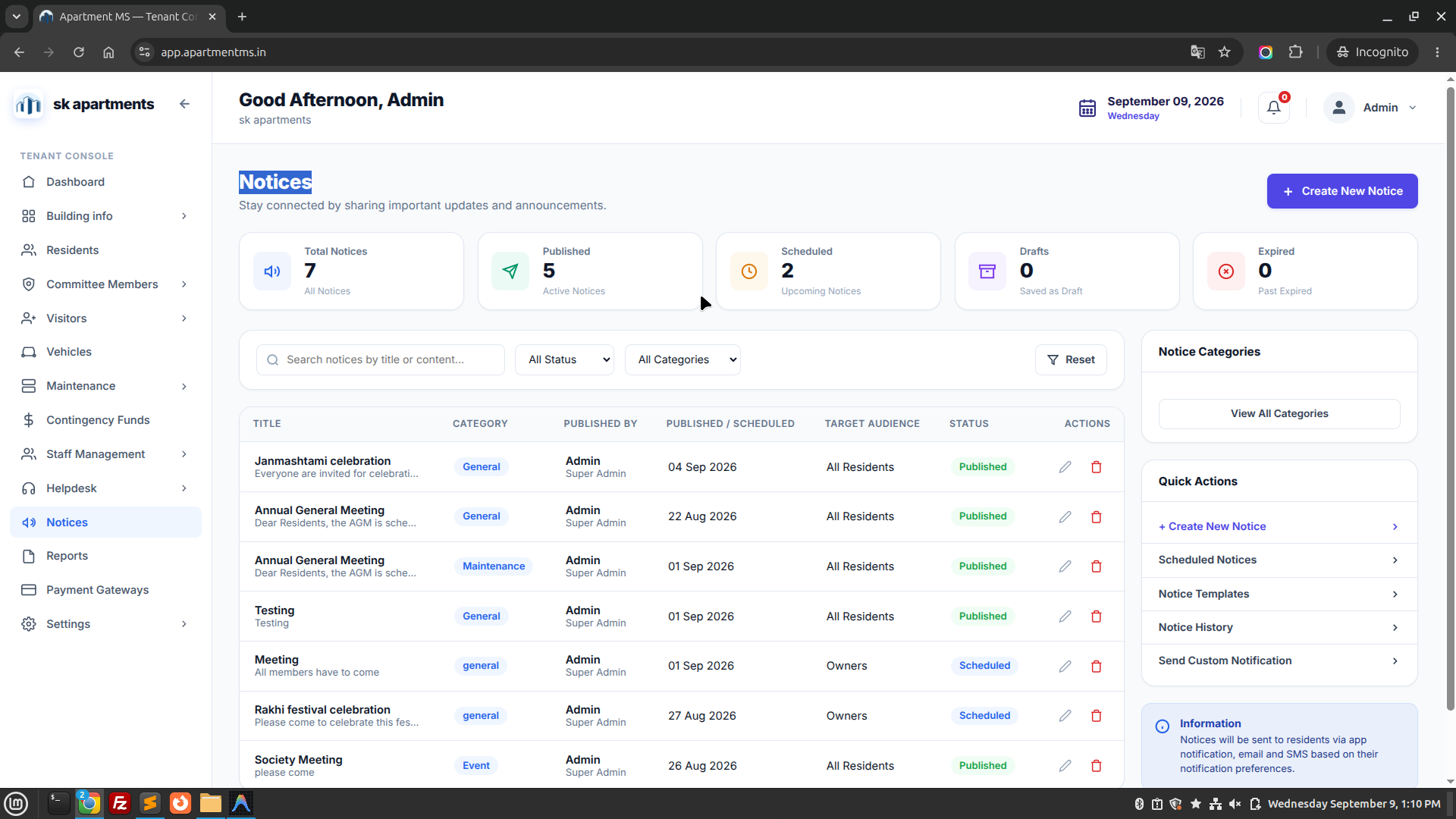
12. Community Notices

Broadcast digital circulars, emergency announcements, festival greetings, and AGM notices directly to resident mobile screens.

  • Multi-Channel Delivery: Publish once to dispatch simultaneous Mobile App Push notifications, SMS alerts, and Email circulars.
  • Targeted Delivery: Broadcast to the whole society or restrict to a specific Block, Wing, or Owners-only.
  • PDF Attachments: Attach audited financial balance sheets, election circulars, and AGM minutes.
Apartment MS — Community Notices & Broadcasts
https://app.apartmentms.in/notices
Apartment MS Notices Screen
Figure 12.1: Digital notices publishing center with circular history, audience targeting, and dispatch statuses. Live Interface
Analytics

13. Reports & Analytics

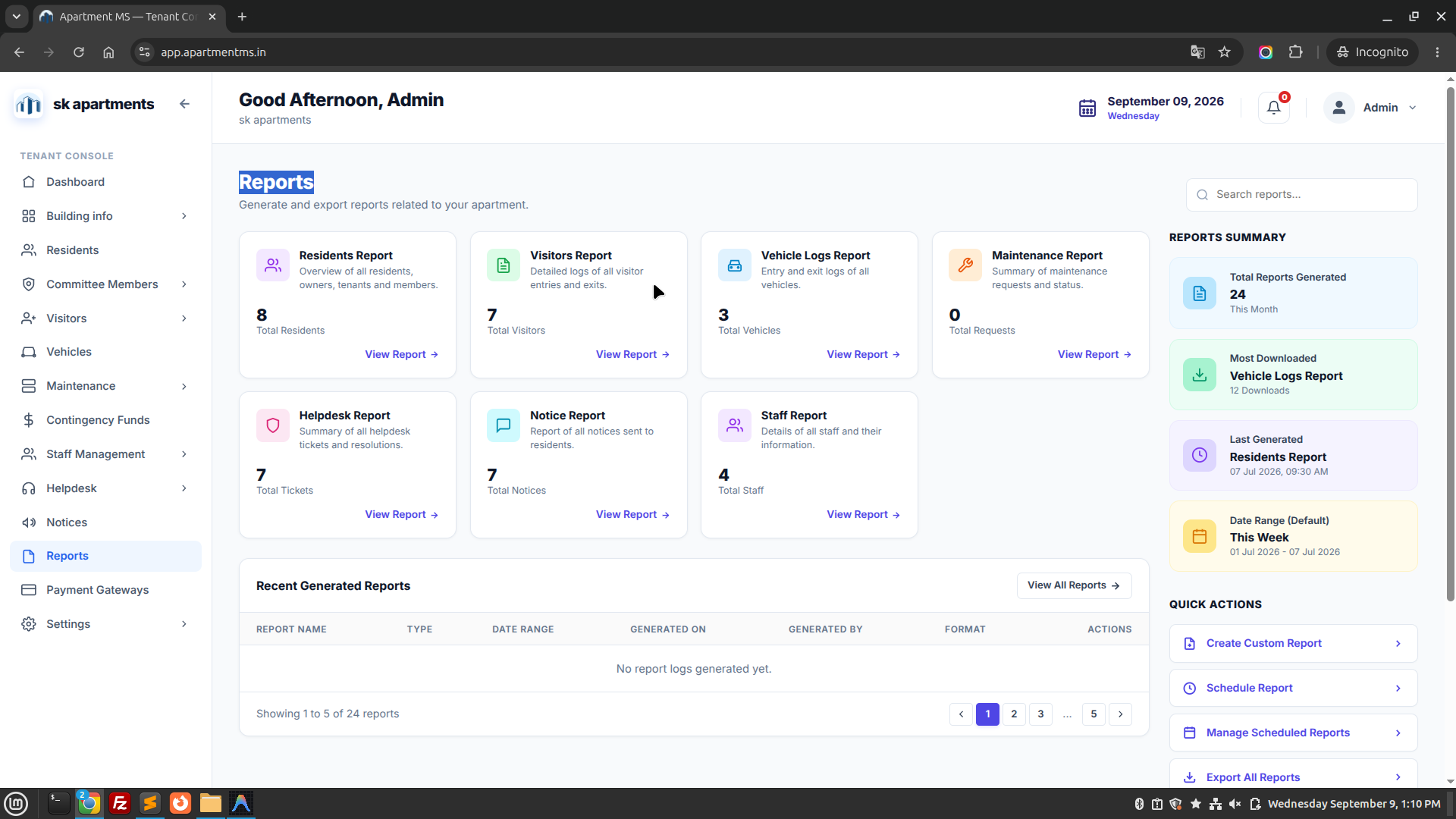
Export comprehensive operational and financial spreadsheets for managing committee review, AGM presentations, and tax audits.

Dues & Collection Audits

Monthly collections versus outstanding defaulter amounts, sorted by block, flat, and tenure.

Occupancy Summary

Flat occupancy rates, owner-occupied vs tenant ratios, and vacant unit duration reports.

Security & Visitor Logs

Comprehensive export of visitor check-in density, peak entry hours, and delivery trends.

Apartment MS — Reports & Analytics Console
https://app.apartmentms.in/reports
Apartment MS Reports Screen
Figure 13.1: Society analytics and report center offering financial spreadsheets, occupancy logs, and audit statements. Live Interface
Instant Settlement

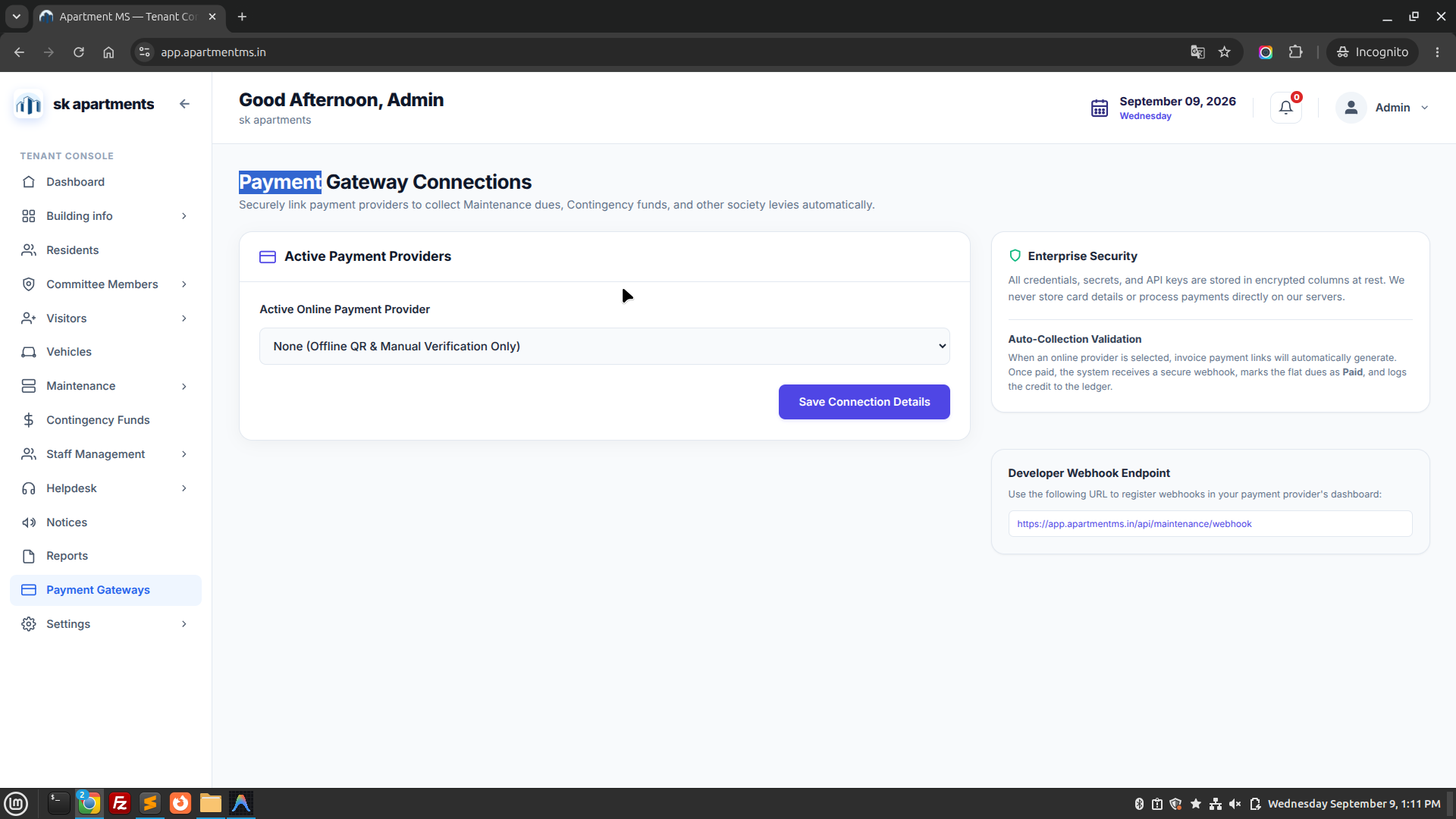
14. Payment Gateway & UPI Integration

Connect online payment processors to collect maintenance dues via UPI QR codes, debit/credit cards, and net banking with automatic instant ledger updates.

  1. Supported Payment Channels

    Instant UPI QR codes (GPay, PhonePe, Paytm), RuPay, Visa, MasterCard, and Net Banking across all major Indian banks.

  2. Zero-Manual Reconciliation

    Webhook confirmations automatically mark maintenance invoices as Paid and generate instant digital receipts for the resident.

  3. Direct Society Bank Account Settlements

    Funds settle directly into the society's registered designated bank account on a T+1 business day basis.

Apartment MS — Payment Gateway & Transactions
https://app.apartmentms.in/payments
Apartment MS Payment Gateway Screen
Figure 14.1: Digital payment transaction console displaying settlement statuses, payment modes, and instant receipts. Live Interface
Administration

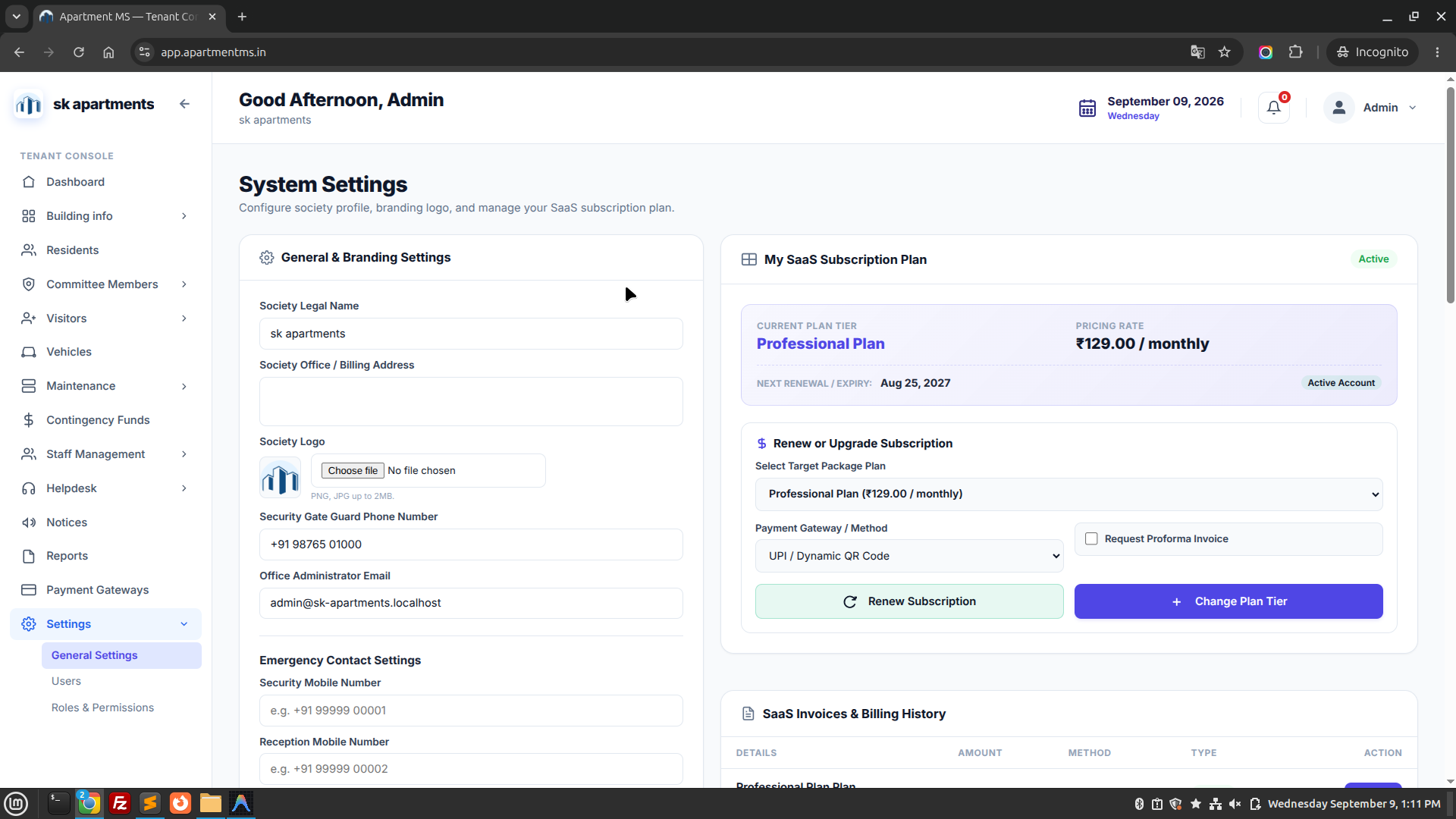
15. System Settings & Administration

Central administration console to configure society master profile details, administer administrative accounts, and define granular security permissions.

A. General Settings

Configure legal society name, registration certificate number, address, branding logo, currency, and fiscal year dates.

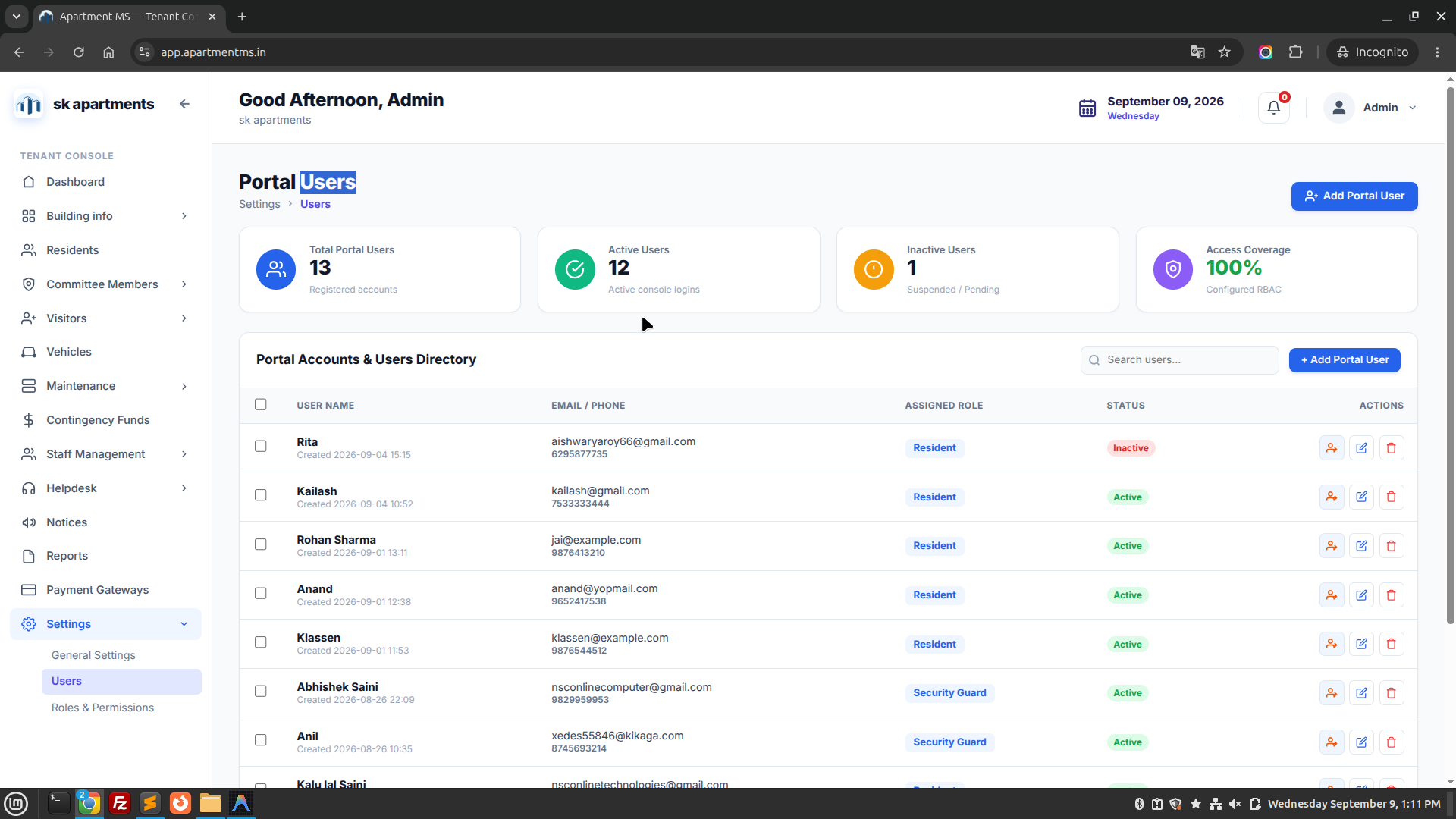
B. Users Directory

Administer user accounts for committee members, accountants, facility managers, and gate security staff.

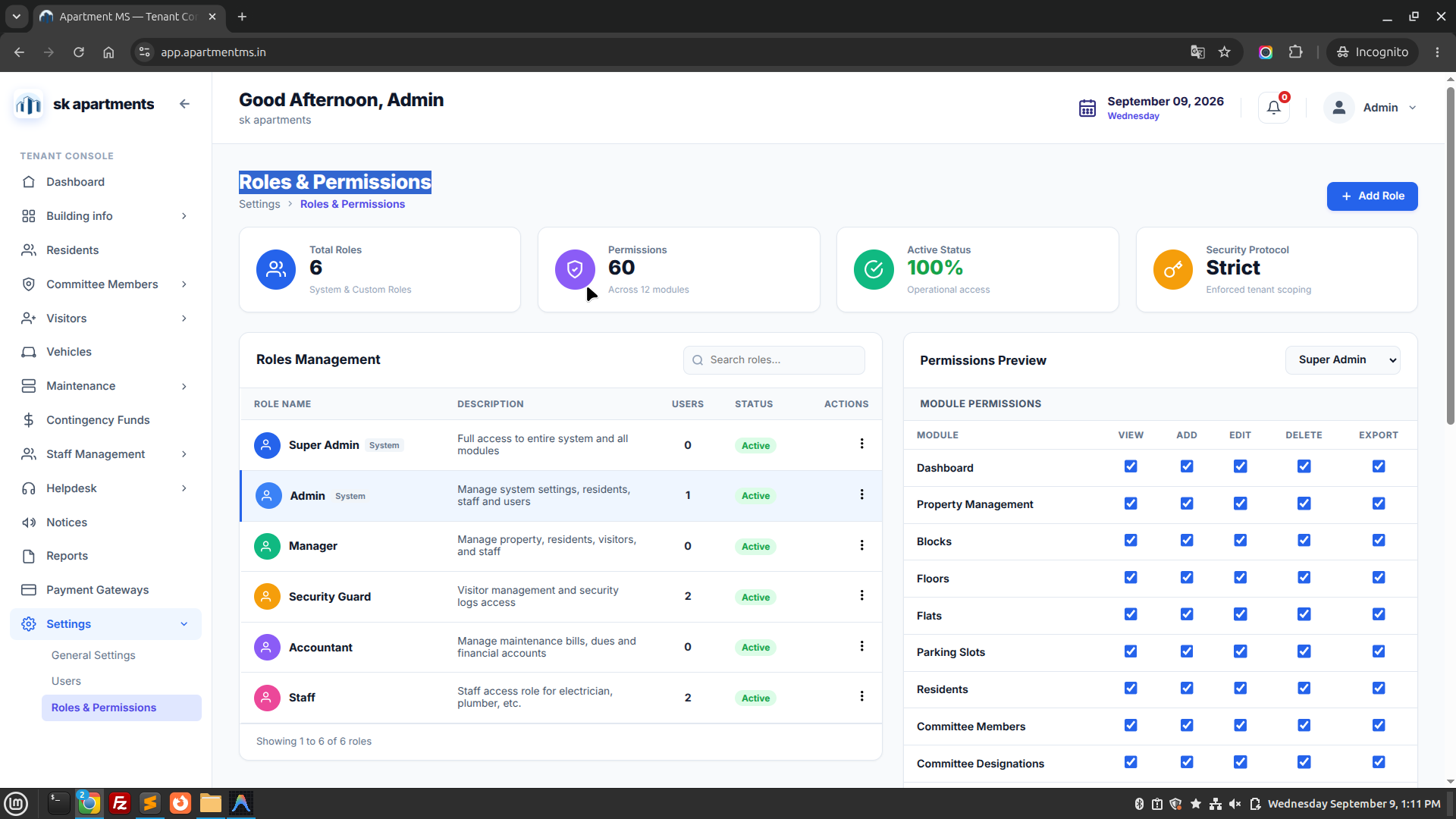
C. Roles & Permissions

Granular Role-Based Access Control (RBAC) matrix defining view, create, edit, and delete permissions for each individual module.

Apartment MS — General Settings
https://app.apartmentms.in/settings/general
Apartment MS General Settings Screen
Figure 15.A: General Society Configuration screen managing legal name, registration details, address, and logo. Live Interface
Apartment MS — Users Directory
https://app.apartmentms.in/settings/users
Apartment MS Users Management Screen
Figure 15.B: System Users management console showing administrative accounts, email addresses, and roles. Live Interface
Apartment MS — Roles & Permissions (RBAC)
https://app.apartmentms.in/settings/roles
Apartment MS Roles and Permissions Screen
Figure 15.C: Role-Based Access Control matrix configuring granular permissions per role. Live Interface
Frequently Asked Questions

Quick solutions to common operational and administrative questions.

You can sign in to the portal at https://app.apartmentms.in/login using email sk@gmail.com and password 12345678.
Yes. In Settings > Billing Configuration, the society administrator can set billing responsibility to either the unit Owner or the registered active Tenant.
You can configure late fees under Maintenance > Billing Settings as either a fixed flat penalty (e.g. ₹200) or an annual interest percentage calculated daily past the grace deadline.
Yes. The guard terminal features offline caching to log visitors locally even if internet connectivity drops temporarily, synchronizing data automatically once reconnected.